TAI BUI
Back to curriculum
BuildPython

Prompt Caching and Context Caching

Your system prompt is 4,000 tokens. Your RAG context is 20,000 tokens. You send both with every request. You also pay for both each time. Prompt caching lets the provider keep that prefix warm on their side and bill you 10% of the normal rate on reuse. Used correctly, it cuts inference cost by 50–90% and first-token latency by 40–85%.

TIME: ~60 minutesPREREQUISITES: Phase 11 · 01 (Prompt Engineering), Phase 11 · 05 (Context Engineering), Phase 11 · 11 (Caching and Cost)

Learning Objectives

  • Calculate the write premium and read discount for Anthropic, OpenAI, and Gemini caching and find the break-even reuse count.
  • Lay out a prompt so the stable prefix sits above a single cache breakpoint and volatile fields sit below it.
  • Configure Anthropic `cache_control` (5-minute and 1-hour TTL), OpenAI automatic caching, and Gemini `CachedContent`.
  • Diagnose cache misses from usage fields and common pitfalls such as timestamps, tool reordering, and undersized blocks.

The Problem

A coding agent sends the same 15,000-token system prompt to Claude on every turn of a conversation. Twenty turns at $3/M input tokens is $0.90 in input cost alone, before any of the user's actual messages. Multiply by 10,000 daily conversations and the bill hits $9,000/day for text that never changes.

You cannot shrink the prompt without hurting quality. You cannot skip sending it, because the model needs it on each turn. The only move is to stop paying full price for a prefix the provider has already seen.

That move is prompt caching. Anthropic shipped it in August 2024 (with a 1-hour extended-TTL variant in 2025), OpenAI automated it later that year, Google shipped explicit context caching alongside Gemini 1.5, and all three now offer it as a first-class feature on their frontier models.
Warm-up0/3
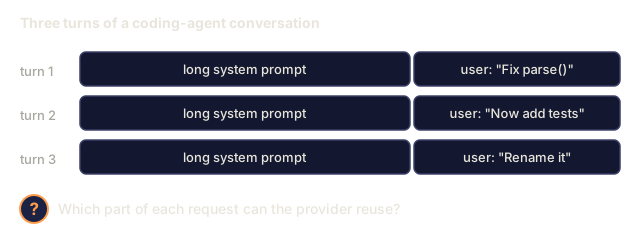
1. A coding agent resends the same long system prompt on every turn of a conversation. Which part of each request is the natural candidate for provider-side reuse?Warm-up
Three requests labelled turn 1 to 3, each drawn as a long system prompt block followed by a different short user message. A question mark asks which part of each request can be reused by the provider.
Illustrative messages, typed for this picture.
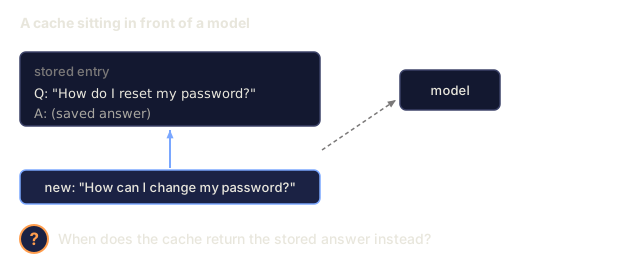
2. From the Caching and Cost prerequisite: when does a semantic cache return a stored answer?Warm-up
A box for a stored cache entry holding the question How do I reset my password? and a saved answer. Below it a new query reads How can I change my password? with an arrow towards the entry and a dashed arrow towards a box labelled model. A question mark asks when the cache returns the stored answer.
Illustrative entry and query, typed for this picture.
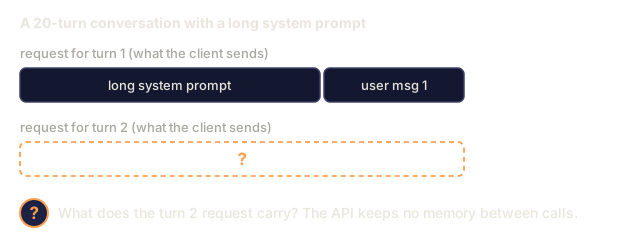
3. A chat completion API keeps no memory between calls. What does that mean for a 20-turn conversation with a long system prompt?Warm-up
The turn 1 request drawn as a long system prompt block and a block for user message 1. Below it the turn 2 request is an empty dashed box with a question mark, asking what it contains.
Schematic of the requests, typed for this picture.
Check: The Problem0/1
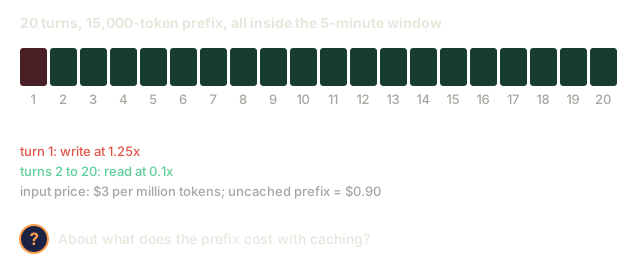
1. A conversation sends a 15,000-token prefix on 20 turns at $3 per million input tokens, and all 20 turns fall within the 5-minute TTL. With Anthropic caching, about what does the prefix cost, versus $0.90 uncached?Apply
Twenty small boxes numbered 1 to 20 for the conversation turns. Turn 1 is red, a write at 1.25 times, and turns 2 to 20 are green, reads at 0.1 times. Notes give the price of $3 per million input tokens and the uncached cost of $0.90. A question mark asks for the cached cost.
Rates and prices from the stem and lesson.

The Concept

Prompt caching: write once, read cheap

The mechanic. When a request's prefix matches one from a recent request, the provider serves the KV-cache from the previous run instead of re-encoding the tokens. You pay a small write premium the first time and a large read discount every time after.

Three provider flavors in 2026.

ProviderAPI styleHit discountWrite premiumDefault TTLMin cacheable
AnthropicExplicit cache_control markers on content blocks90% off input25% surcharge5 min (extendable to 1 hour)1,024 tokens (Sonnet/Opus), 2,048 (Haiku)
OpenAIAutomatic prefix detection50% off inputnoneUp to 1 hour (best-effort)1,024 tokens
Google (Gemini)Explicit CachedContent APIStorage-billed; read at ~25% of normalStorage fee per token·hourUser-set (default 1 hour)4,096 tokens (Flash), 32,768 (Pro)

The invariant. All three cache prefixes only. If any token differs between requests, everything after the first differing token is a miss. Put the stable parts at the top, the variable parts at the bottom.

The cache-friendly layout

[system prompt]          <-- cache this
[tool definitions]       <-- cache this
[few-shot examples]      <-- cache this
[retrieved documents]    <-- cache if reused, else don't
[conversation history]   <-- cache up to last turn
[current user message]   <-- never cache (different every time)

Violate the order by putting the user message above the system prompt, or by interleaving dynamic retrievals between few-shots, and the cache will not hit.

The break-even calculation

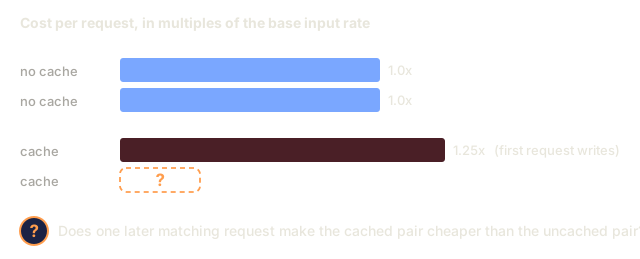
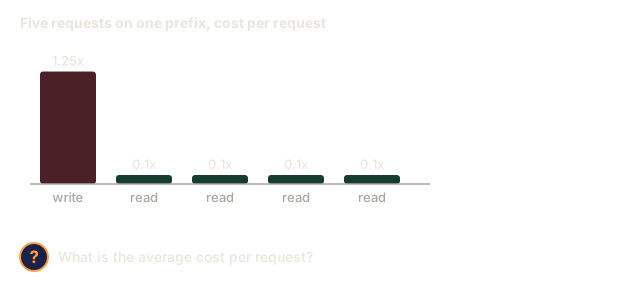
Anthropic's 25% write premium means a cached block has to be read at least once to net-save money. 1 write + 1 read averages 0.675x cost per request (saves 32%); 1 write + 10 reads averages 0.205x (saves 80%). Rule of thumb: cache anything you expect to reuse at least 3 times within the TTL.
Check: The Concept0/13
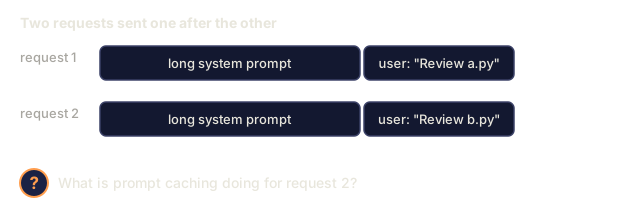
1. What is prompt caching?Define
Two requests labelled request 1 and request 2. Each is a long system prompt block followed by a user message, Review a.py in the first and Review b.py in the second. A question mark asks what prompt caching does for request 2.
Illustrative requests, typed for this picture.
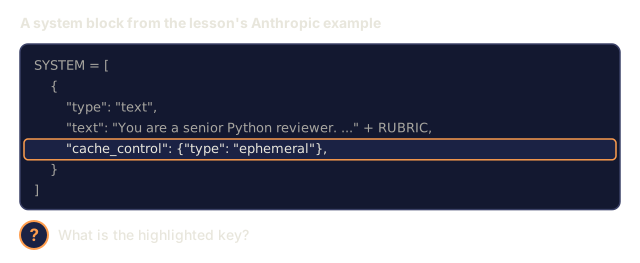
2. What is `cache_control` in Anthropic's API?Define
Python code from the lesson: a SYSTEM list holding one dictionary with keys type, text and cache_control. The cache_control line, set to a dictionary with type ephemeral, is highlighted. A question mark asks what the highlighted key is.
Code copied from the lesson (shortened text).
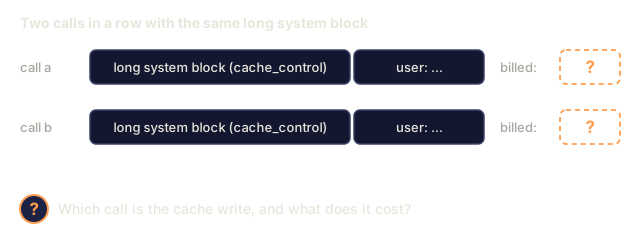
3. What is a cache write?Define
Two calls in a row, call a and call b, each a long system block with a cache_control marker followed by a user message. Each has a billed amount shown as a question mark. A question mark asks which call is the cache write and what it costs.
Illustrative requests, typed for this picture.
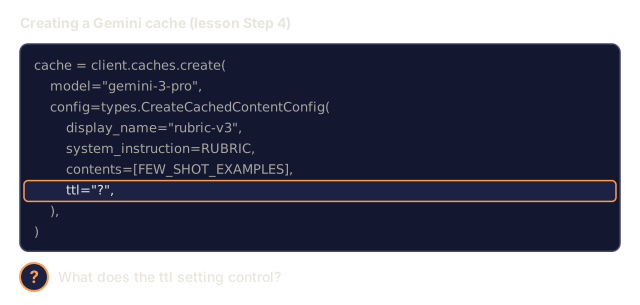
4. What is a cache's TTL?Define
Code from the lesson that creates a Gemini cache, with display_name rubric-v3, a system instruction, few-shot contents and a ttl setting whose value is replaced by a question mark and highlighted. A question mark asks what ttl controls.
Code from the lesson with the ttl value hidden.
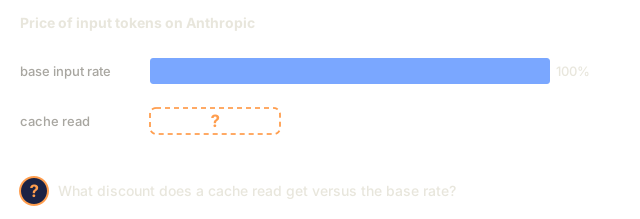
5. What discount does Anthropic apply to a cache read versus the base input rate?Define
A full-length bar for the base input rate, marked 100 percent, and below it a dashed empty bar with a question mark for the Anthropic cache read price. A question mark asks what discount a cache read gets.
Bar lengths are schematic.
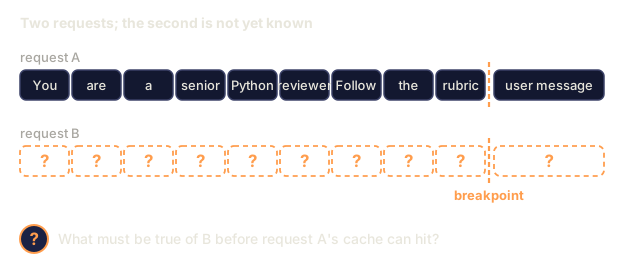
6. What does a prefix match require before a cache can hit?Define
Request A drawn as nine word-sized token cells reading You are a senior Python reviewer Follow the rubric, then a dashed breakpoint line, then a user message cell. Request B has nine empty question-mark cells, a breakpoint line and a question-mark message cell. A question mark asks what must be true of B for A's cache to hit.
Illustrative words standing in for tokens; typed for this picture.
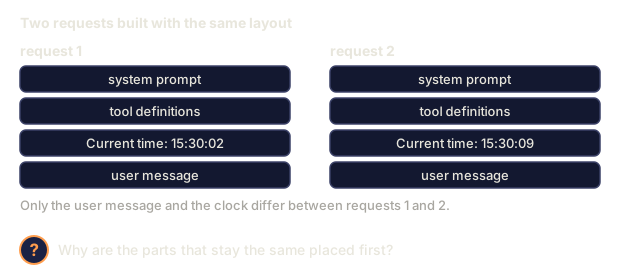
7. Why do the stable parts of a prompt belong at the top and the variable parts at the bottom?Explain
Two requests side by side, each a stack of four blocks in the same order: system prompt, tool definitions, Current time, user message. The clock reads 15:30:02 in request 1 and 15:30:09 in request 2. A question mark asks why the parts that stay the same are placed first.
Illustrative layout and clock values, typed for this picture.
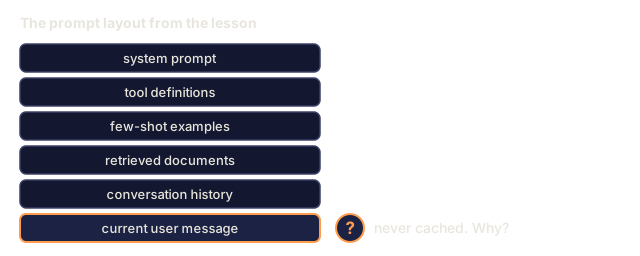
8. Why is the current user message the one part of the layout that is never cached?Explain
A vertical stack of six prompt parts from top to bottom: system prompt, tool definitions, few-shot examples, retrieved documents, conversation history and current user message. The last one is outlined in orange with a question mark asking why it is never cached.
Layout order from the lesson.
9. Why does a cached Anthropic block need at least one read to net-save money despite the 25% write premium?Explain
Two blue bars for two uncached requests, each 1.0 times the base rate, and a red bar for a cached first request at 1.25 times with a dashed question-mark bar for the second cached request. A question mark asks whether one later matching request makes the cached pair cheaper than the uncached pair.
Bars drawn to scale from the lesson's rates.
10. Using the lesson's rates (write 1.25x, read 0.1x), what is the average cost per request of 1 write followed by 4 reads?Apply
Five bars: the first, a write at 1.25 times the base rate, followed by four short read bars at 0.1 times each. A question mark asks for the average cost per request.
Bars drawn to scale from the stem's rates.
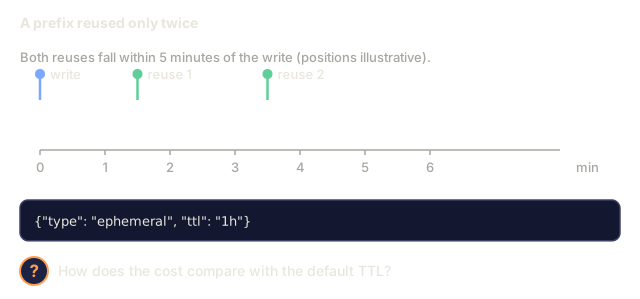
11. A team enables `ttl: "1h"` on a prefix that is reused only twice, both times within 5 minutes of the write. How does the cost compare with the default TTL?Analyze
A time axis from 0 to 6 minutes with a write at minute 0 and two reuses at about minutes 1.5 and 3.5, all inside 5 minutes. Below, a cache_control setting with ttl 1h. A question mark asks how the cost compares with the default TTL.
Reuse positions are illustrative; only 'within 5 minutes' is from the stem.
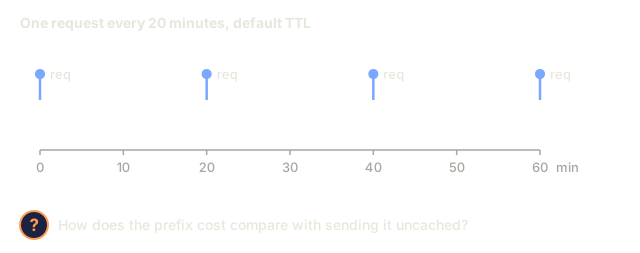
12. On Anthropic's default TTL, a prefix is requested once every 20 minutes. Compared with sending it uncached, what happens to the prefix cost?Analyze
A time axis from 0 to 60 minutes with a request marked at minutes 0, 20, 40 and 60. A question mark asks how the prefix cost compares with sending it uncached.
Spacing from the stem.
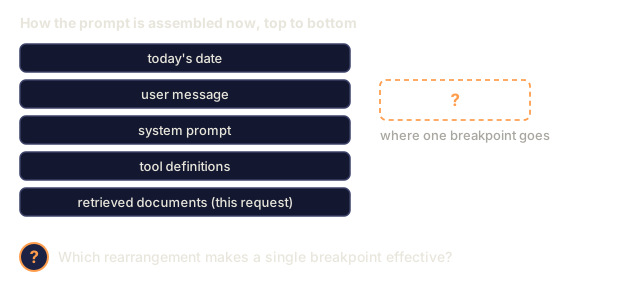
13. A prompt is assembled as: today's date, the user message, the system prompt, tool definitions, then documents retrieved for this request. Which layout makes one breakpoint effective?Design
A top-to-bottom stack of five prompt parts: today's date, user message, system prompt, tool definitions, and retrieved documents for this request. A dashed question-mark box at the right asks where one breakpoint goes. A question mark asks which rearrangement makes it effective.
Order as given in the stem.

Build It

Step 1: Anthropic prompt caching with explicit markers

python
import anthropic
 
client = anthropic.Anthropic()
 
SYSTEM = [
    {
        "type": "text",
        "text": "You are a senior Python reviewer. Follow the rubric exactly.\n\n" + RUBRIC_15K_TOKENS,
        "cache_control": {"type": "ephemeral"},
    }
]
 
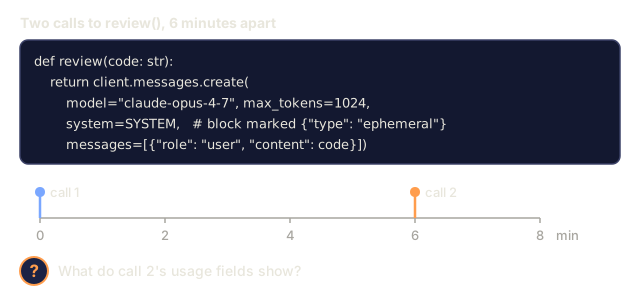
def review(code: str):
    return client.messages.create(
        model="claude-opus-4-7",
        max_tokens=1024,
        system=SYSTEM,
        messages=[{"role": "user", "content": code}],
    )

The cache_control marker tells Anthropic to store the block for 5 minutes. Reuse within that window hits; reuse after expires and writes again.

Response usage fields:

python
response = review(code_a)
response.usage
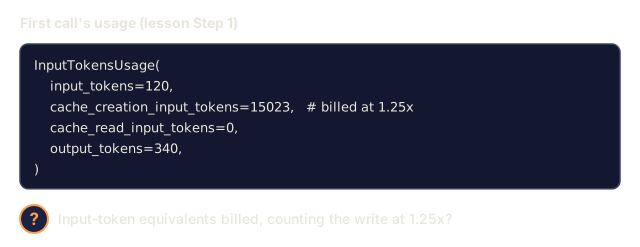
# InputTokensUsage(
#     input_tokens=120,
#     cache_creation_input_tokens=15023,   # paid at 1.25x
#     cache_read_input_tokens=0,
#     output_tokens=340,
# )
 
response_b = review(code_b)
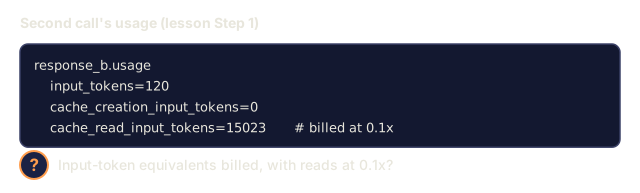
response_b.usage
# cache_creation_input_tokens=0
# cache_read_input_tokens=15023           # paid at 0.1x

Check both fields in CI. If cache_read_input_tokens stays at zero across requests, your cache keys are drifting.

Step 2: one-hour extended TTL

For long-running batch jobs, the 5-minute default expires between jobs. Set ttl:

python
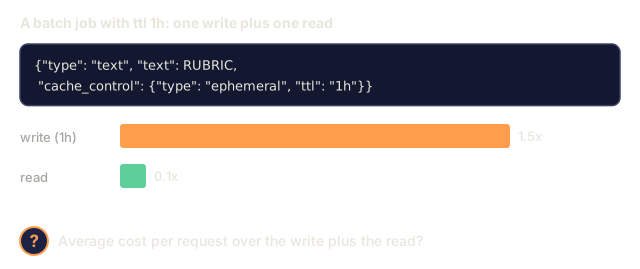
{"type": "text", "text": RUBRIC, "cache_control": {"type": "ephemeral", "ttl": "1h"}}

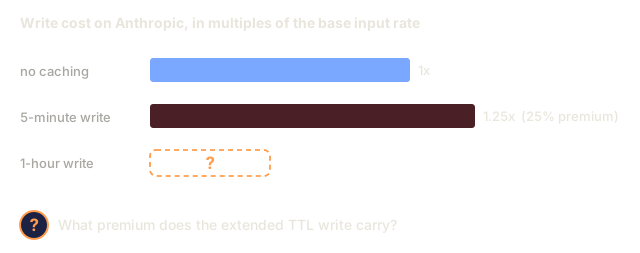
1-hour TTL costs 2x the write premium (50% over baseline instead of 25%) but pays back fast on any batch reusing the prefix more than 5 times.

Step 3: OpenAI automatic caching

OpenAI gives you nothing to configure. Any prefix over 1,024 tokens that matches a recent request gets a 50% discount automatically.

python
from openai import OpenAI
client = OpenAI()
 
resp = client.chat.completions.create(
    model="gpt-5",
    messages=[
        {"role": "system", "content": SYSTEM_PROMPT},   # long and stable
        {"role": "user", "content": user_msg},
    ],
)
resp.usage.prompt_tokens_details.cached_tokens  # the discounted portion

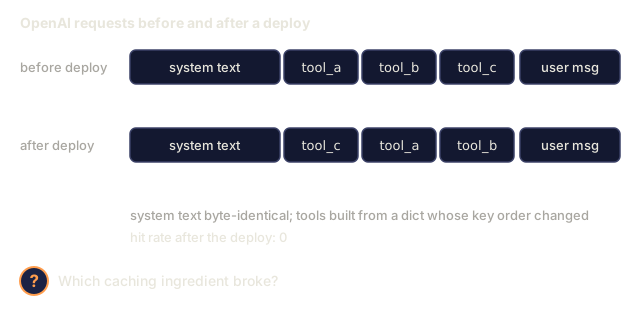
Same cache-friendly layout rule applies. Changing the user field (used as a cache key component) breaks OpenAI's cache and not Anthropic's. Reordering tools breaks both, since tool definitions are part of the cached prefix.

Step 4: Gemini explicit context caching

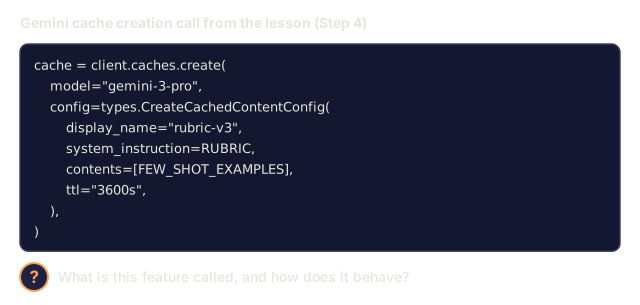
Gemini treats the cache as a first-class object you create and name:

python
from google import genai
from google.genai import types
 
client = genai.Client()
 
cache = client.caches.create(
    model="gemini-3-pro",
    config=types.CreateCachedContentConfig(
        display_name="rubric-v3",
        system_instruction=RUBRIC,
        contents=[FEW_SHOT_EXAMPLES],
        ttl="3600s",
    ),
)
 
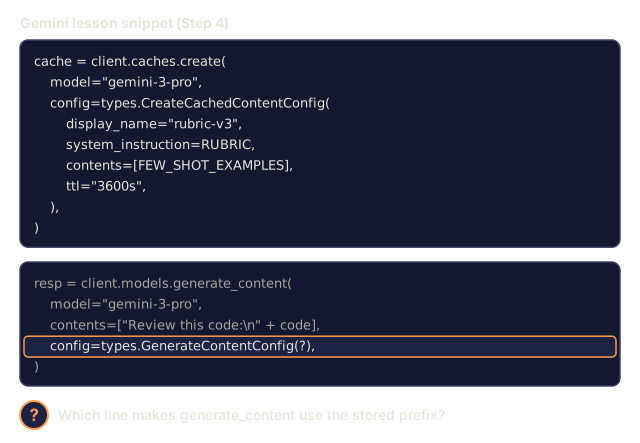
resp = client.models.generate_content(
    model="gemini-3-pro",
    contents=["Review this code:\n" + code],
    config=types.GenerateContentConfig(cached_content=cache.name),
)

Gemini charges storage per token·hour for as long as the cache lives, and reads at ~25% of normal input rate. This is the right shape when you reuse the same giant prompt across many sessions over days.

Step 5: measuring hit rate in production

See code/main.py for a simulated three-provider accountant that tracks write/read/miss counts and computes blended cost per 1K requests. Gate deploys on a target hit rate. Most production Anthropic setups should see >80% read fraction after warmup.
Check: Build It0/11
1. What does Anthropic's extended TTL cost in write premium compared with the 5-minute default?Define
Three horizontal bars of write cost. No caching is 1x, the 5-minute default write is 1.25x with a 25 percent premium, and the 1-hour write is a dashed empty bar with a question mark. A question mark asks what premium the extended TTL write carries.
Bars drawn to scale from the lesson's rates.
2. What is Gemini's context caching?Define
Code from the lesson that calls client.caches.create for model gemini-3-pro with display name rubric-v3, a system instruction, few-shot contents and a ttl of 3600s. A question mark asks what the feature is and how it behaves.
Code copied from the lesson's Step 4.
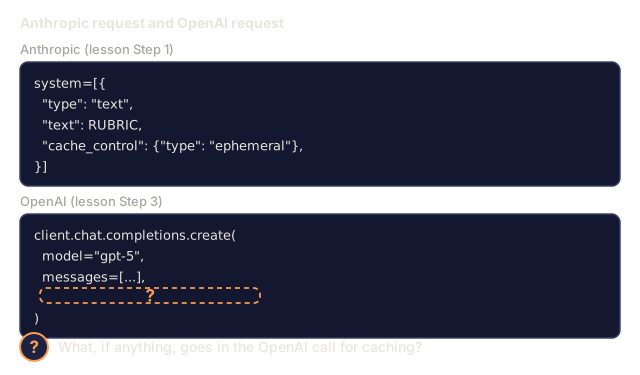
3. How is OpenAI's prompt caching configured, compared with Anthropic's?Define
Two code snippets side by side. Anthropic's has a system block with a cache_control key. OpenAI's is a chat.completions.create call with model gpt-5 and messages, and an empty dashed box with a question mark inside the call. A question mark asks what, if anything, goes in the OpenAI call for caching.
Code simplified from the lesson.
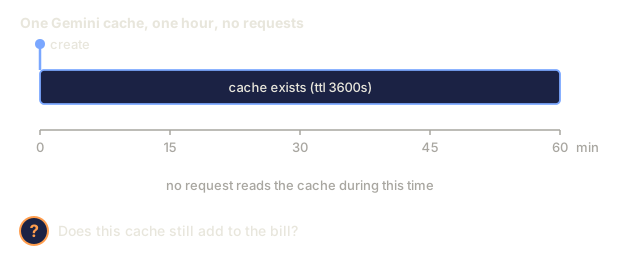
4. Why can a Gemini cache cost money even when no request reads it?Explain
A time axis from 0 to 60 minutes with a bar for the cache existing with ttl 3600s, starting at a create marker. A note says no request reads the cache during this time. A question mark asks whether the cache still adds to the bill.
Schematic. The 3600s ttl is from the lesson's Step 4 code.
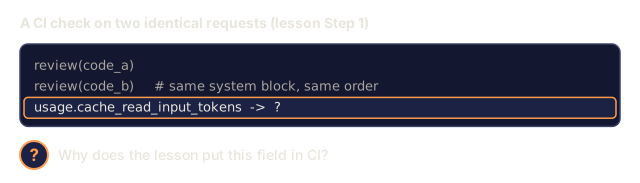
5. Why does the lesson suggest checking `cache_read_input_tokens` in CI?Explain
Two lines calling review(code_a) and review(code_b) with the same system block, and a highlighted line reading usage.cache_read_input_tokens with a question mark as its value. A question mark asks why the lesson puts this field in CI.
Calls as in the lesson; the value is hidden.
6. In the Anthropic usage example, the first call reports input_tokens=120 and cache_creation_input_tokens=15023. Counting the write at 1.25x, about how many input-token equivalents is it billed for?Apply
The first call's usage object from the lesson: input_tokens 120, cache_creation_input_tokens 15023 marked as billed at 1.25x, cache_read_input_tokens 0 and output_tokens 340. A question mark asks for the input-token equivalents billed.
Usage numbers copied from the lesson.
7. The second call reports input_tokens=120 and cache_read_input_tokens=15023. With reads at 0.1x, about how many input-token equivalents is it billed for?Apply
The second call's usage from the lesson: input_tokens 120, cache_creation_input_tokens 0 and cache_read_input_tokens 15023 marked as billed at 0.1x. A question mark asks for the input-token equivalents billed.
Usage numbers copied from the lesson.
8. The `review()` function marks its system block with the default `cache_control`. It is called, then called again 6 minutes later. What does the second call's usage show?Apply
The review() function from the lesson with a system block marked ephemeral, and below it a time axis from 0 to 8 minutes with call 1 at minute 0 and call 2 at minute 6. A question mark asks what call 2's usage fields show.
Code simplified from the lesson; timing from the stem.
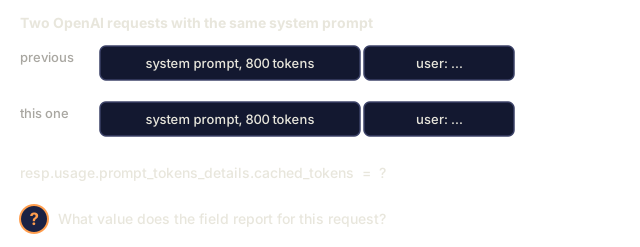
9. On OpenAI, a request has an 800-token system prompt that is identical to the previous request's. What does `resp.usage.prompt_tokens_details.cached_tokens` report?Apply
Two requests labelled previous and this one, each with an 800-token system prompt block followed by a user message block. Below, the line resp.usage.prompt_tokens_details.cached_tokens equals a question mark. A question mark asks what value it reports.
Illustrative request layout; token count from the stem.
10. In the Gemini snippet, which line makes `generate_content` use the stored prefix?Apply
The lesson's Gemini code. A cache creation call with display_name rubric-v3, system instruction, few-shot contents and ttl 3600s, then a generate_content call whose config argument is shown as a question mark and highlighted. A question mark asks which line makes generate_content use the stored prefix.
Code copied from the lesson; one argument hidden.
11. A batch job sets `ttl` to `"1h"` on its system block. Using the lesson's rates (1h write at 1.5x, read at 0.1x), what is the average cost per request of 1 write plus 1 read?Apply
A cache_control block with ttl 1h, and two bars: a 1-hour write at 1.5 times the base rate and a read at 0.1 times. A question mark asks for the average cost per request over the write plus the read.
Rates from the stem; bars drawn to scale.

Pitfalls that still ship in 2026

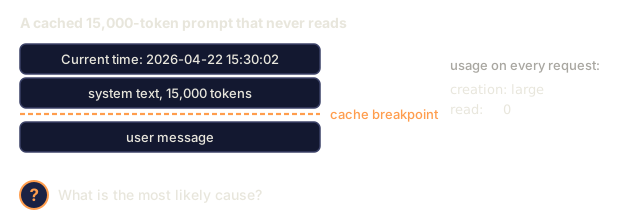
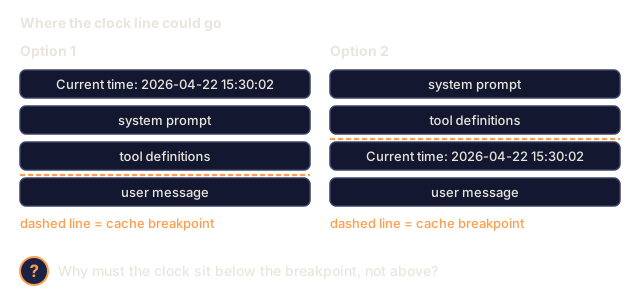
  • Dynamic timestamps at the top. "Current time: 2026-04-22 15:30:02" at the top of the system prompt. Every request misses. Move timestamps below the cache breakpoint.
  • Tool reordering. Serialize tools in a stable order, because a dict reshuffle between deploys breaks the hits.
  • Free-text near-duplicates. "You are helpful." vs "You are a helpful assistant." A one-byte difference is a full miss.
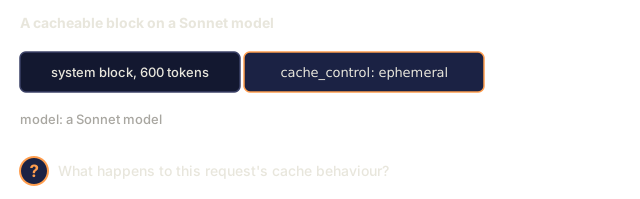
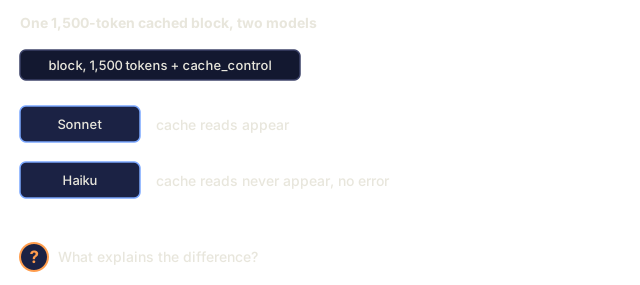
  • Too-small blocks. Anthropic enforces a 1,024-token floor (2,048 for Haiku). Smaller blocks silently do not cache.
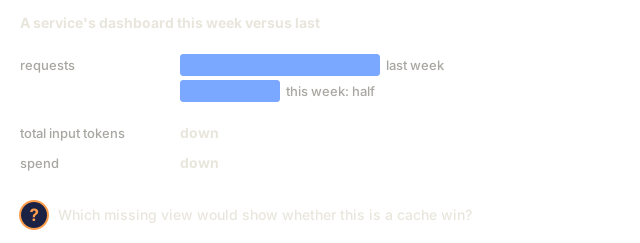
  • Blind cost dashboards. Split "input tokens" into cached vs uncached. Otherwise a traffic drop looks like a cache win.
Check: Pitfalls that still ship in 20260/6
1. Why must a dynamic timestamp go below the cache breakpoint rather than above it?Explain
Two prompt layouts. In Option 1 a line reading Current time: 2026-04-22 15:30:02 comes first, then system prompt and tool definitions, then a dashed breakpoint, then the user message. In Option 2 the system prompt and tool definitions come first, then the dashed breakpoint, then the clock line, then the user message. A question mark asks why the second is required.
Layouts typed for this picture; the timestamp text is the lesson's pitfall example.
2. A cacheable Anthropic block is only 600 tokens long on a Sonnet model. What happens?Explain
A block labelled system block, 600 tokens, next to a cache_control ephemeral marker, with a note that the model is a Sonnet model. A question mark asks what happens to the request's cache behaviour.
Block size from the question stem.
3. Every request to a 15,000-token cached prompt reports a large cache_creation_input_tokens and cache_read_input_tokens of 0, though the system text looks unchanged. The prompt begins with "Current time: 2026-04-22 15:30:02". What is the most likely cause?Analyze
A prompt drawn as four rows: a line Current time: 2026-04-22 15:30:02, system text of 15,000 tokens, a dashed cache breakpoint, and a user message. A note says usage on every request shows a large creation count and 0 reads. A question mark asks for the most likely cause.
Prompt as described in the stem.
4. The same 1,500-token cached block produces cache reads on Sonnet but never on Haiku, and no error appears. What explains it?Analyze
A block of 1,500 tokens with a cache_control marker, and two results. For a Sonnet model, cache reads appear. For a Haiku model, cache reads never appear and there is no error. A question mark asks what explains the difference.
Scenario from the stem.
5. A service on OpenAI automatic caching sees its hit rate fall to zero after a deploy. The system text is byte-identical, but tool definitions are now built from a dict whose key order changed. Which ingredient broke?Analyze
Two request rows. Before deploy: system text unchanged, tools tool_a, tool_b, tool_c, user message. After deploy: the same system text, then tool_c, tool_a, tool_b, user message. Notes say the tools come from a dict whose key order changed and the hit rate is 0 after the deploy. A question mark asks which ingredient broke.
Tool names are placeholders typed for this picture.
6. Traffic to a service halves, and its dashboard shows total input tokens and spend dropping. The team calls it a cache win. Which missing view would show whether that is true?Analyze
Dashboard readings: two bars show requests this week at half of last week's, and notes say total input tokens and spend are both down. A question mark asks which missing view would show whether this is a cache win.
Bars show only the stem's halving; tokens and spend are not given in numbers.

Use It

The 2026 caching stack:

SituationPick
Agent with stable 10k+ system prompt, many turnsAnthropic cache_control with 5-min TTL
Batch job reusing a prefix for 30+ minutesAnthropic with ttl: "1h"
Serverless endpoints on GPT-5, no custom infraOpenAI automatic (just make your prefix stable and long)
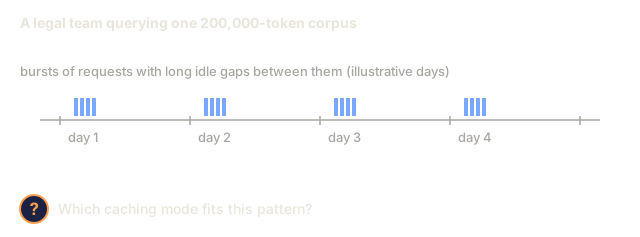
Multi-day reuse of a giant code/doc corpusGemini explicit CachedContent
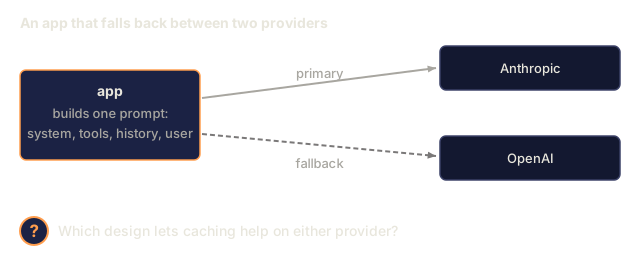
Cross-provider fallbackKeep the cacheable prefix layout identical across providers so any hit works

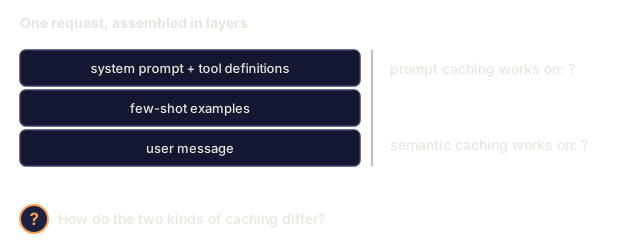
Combine with semantic caching (Phase 11 · 11) for the user-message layer: prompt caching handles token-identical reuse, semantic caching handles meaning-identical reuse.
Check: Use It0/4
1. How do prompt caching and semantic caching differ?Explain
A request drawn as three stacked blocks: system prompt plus tool definitions, few-shot examples, and user message. At the right, two prompts read prompt caching works on question mark and semantic caching works on question mark. A question mark asks how the two kinds of caching differ.
Layers simplified from the lesson's layout.
2. An app falls back between Anthropic and OpenAI depending on availability, and wants prompt caching to help on either provider. Which design fits?Design
An app box that builds one prompt of system, tools, history and user message, with a solid arrow to Anthropic labelled primary and a dashed arrow to OpenAI labelled fallback. A question mark asks which design lets caching help on either provider.
Simplified diagram typed for this picture.
3. A legal team queries the same 200,000-token document corpus in bursts over several days, with long idle gaps in between. Which caching mode fits?Design
A time axis with four day markers. On each day a small cluster of request bars, and long empty gaps between clusters. A note says bursts of requests with long idle gaps, and the corpus is 200,000 tokens. A question mark asks which caching mode fits.
Bursts are typed for this picture; the number of days is illustrative.
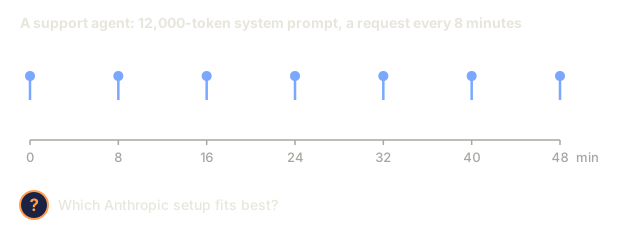
4. A support agent has a stable 12,000-token system prompt and receives one request about every 8 minutes, all day. Which setup fits best on Anthropic?Design
A time axis from 0 to 48 minutes with a request marked every 8 minutes. A question mark asks which Anthropic setup fits best.
Spacing from the stem.

Ship It

Save outputs/skill-prompt-caching-planner.md:

markdown
---
name: prompt-caching-planner
description: Design a cache-friendly prompt layout and pick the right provider caching mode.
version: 1.0.0
phase: 11
lesson: 15
tags: [llm-engineering, caching, cost]
---
 
Given a prompt (system + tools + few-shot + retrieval + history + user) and a usage profile (requests per hour, TTL needed, provider), output:
 
1. Layout. Reordered sections with a single cache breakpoint marked; explain which sections are stable, which are volatile.
2. Provider mode. Anthropic cache_control, OpenAI automatic, or Gemini CachedContent. Justify from TTL and reuse pattern.
3. Break-even. Expected reads per write within TTL; net cost vs no-cache with math.
4. Verification plan. CI assertion that cache_read_input_tokens > 0 on the second identical request; dashboard split by cached vs uncached tokens.
5. Failure modes. List the three most likely reasons the cache will miss in this setup (dynamic timestamp, tool reorder, near-duplicate text) and how you will prevent each.
 
Refuse to ship a cache plan that places a dynamic field above the breakpoint. Refuse to enable 1h TTL without a reuse count that makes the 2x write premium pay back.
Author's Note

I'd run main.py first and then break its one assumption. seconds_between is a local in main(), set to 4. At that spacing the three rotating prefixes each come back every 12 seconds, so the 5-minute run writes 21 times across 500 requests and saves about 83% against no caching. Set it to 400 and each prefix comes back every 1,200 seconds, long past the 5-minute TTL. All 500 requests become writes, and the run costs about 24% more than not caching at all. The 1-hour run still gets 332 reads at that spacing, which is the cleanest demonstration of the break-even section I know of.

Two details in the simulator are worth knowing before you trust its numbers. It does not refresh a TTL on a read, so the 5-minute case rewrites on a fixed clock from the first write. And the misses counter stays at zero: an expired entry is counted as a write, since that is what it costs you. The Gemini storage line comes out tiny next to the input cost here, but it bills for the full TTL on each entry whether or not anyone reads it, so low-traffic caches are where I'd check it first.

The prices are hard-coded in PRICES. Edit them to match your own rate card before drawing any conclusion about your workload.

Exercises

  1. Easy. Take a 10-turn conversation with a 5,000-token system prompt against Claude. Run it without cache_control and then with. Report the input-token bill for each.
  2. Medium. Write a test harness that, given a prompt template and a request log, computes the expected hit rate and dollar savings per provider (Anthropic 5m, Anthropic 1h, OpenAI automatic, Gemini explicit).
  3. Hard. Build a layout optimizer: given a prompt and a list of fields marked stable=True/False, rewrite the prompt to put a single cache breakpoint at the maximum cache-friendly position without losing information. Verify on a real Anthropic endpoint.

Key Terms

TermWhat people sayWhat it actually means
Prompt caching"Makes long prompts cheap"Reusing a provider-side KV-cache for matching prefixes; 50-90% discount on repeated input tokens.
cache_control"The Anthropic marker"Content-block attribute that declares "everything up to here is cacheable"; {"type": "ephemeral"}.
Cache write"Paying the premium"The first request that populates the cache; billed at ~1.25x input rate on Anthropic, free on OpenAI.
Cache read"The discount"Subsequent requests matching the prefix; billed at 10% (Anthropic), 50% (OpenAI), ~25% (Gemini).
TTL"How long it lives"Seconds the cache stays warm; Anthropic 5m default (extendable 1h), OpenAI best-effort up to 1h, Gemini user-set.
Extended TTL"1-hour Anthropic cache"{"type": "ephemeral", "ttl": "1h"}; 2x write premium but worth it for batch reuse.
Prefix match"Why my cache missed"Caches only hit when every token from the start up to the breakpoint is byte-identical.
Context caching (Gemini)"The explicit one"Google's named, storage-billed cache object; best for multi-day reuse of large corpora.

Further Reading

Code

Ships With