Learning Rate Schedules and Warmup
The learning rate is the single most important hyperparameter you'll tune. Not the architecture, not the dataset size, not the activation function. If you tune nothing else, tune this.
Learning Objectives
- Implement constant, step decay, cosine annealing, warmup + cosine, and 1cycle learning rate schedules from scratch
- Demonstrate the three failure modes of learning rate selection: divergence (too high), stalling (too low), and oscillation (no decay)
- Explain why warmup is necessary for Adam-based optimizers and how it stabilizes early training
- Compare convergence speed across all five schedules on the same task and select the appropriate one for a given training budget
The Problem
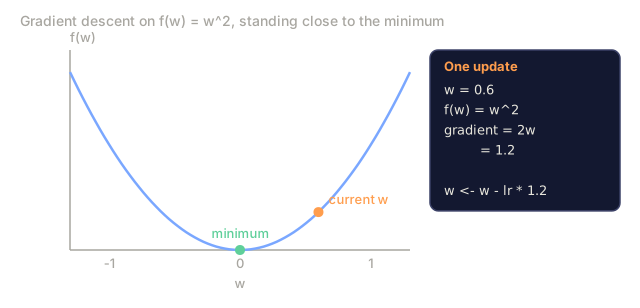
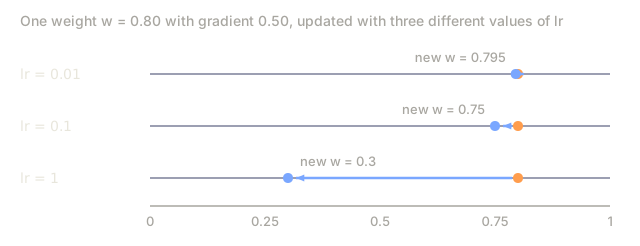
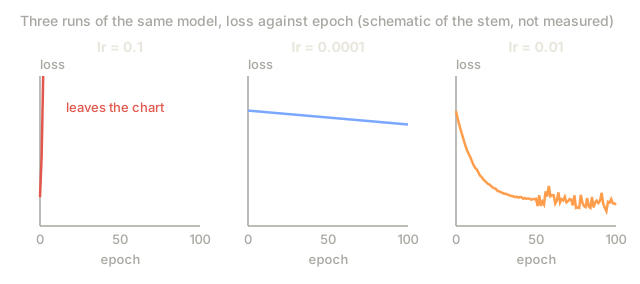
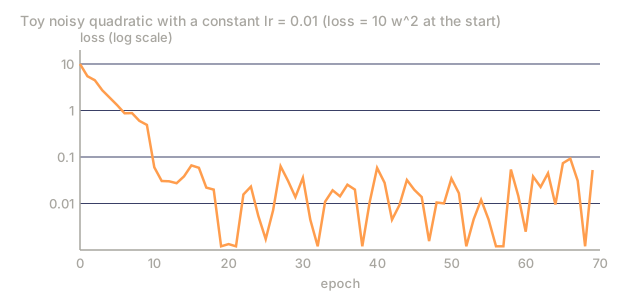
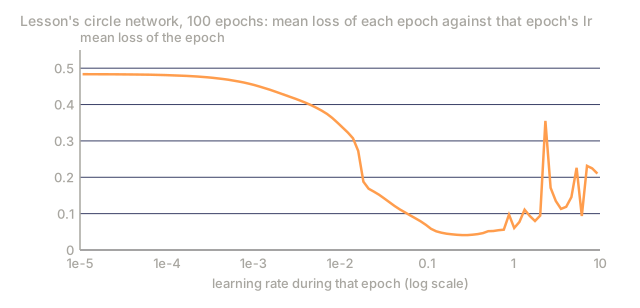
Set the learning rate to 0.1 and training diverges: loss jumps to infinity in three steps. Set it to 0.0001 and training crawls: after 100 epochs, the model has barely moved from random. Set it to 0.01 and training looks fine for 50 epochs, then the loss starts oscillating around a minimum it can never reach because the steps are too large.
The optimal learning rate isn't a constant. It changes as training progresses: early on you want large steps that cover ground fast, and late in training you want tiny steps that settle into a sharp minimum. The gap between a 90% accurate model and a 95% accurate model is often nothing but the schedule.
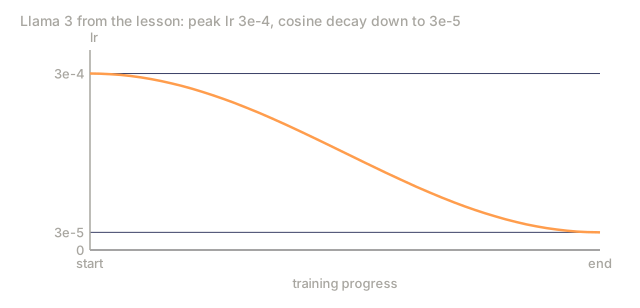
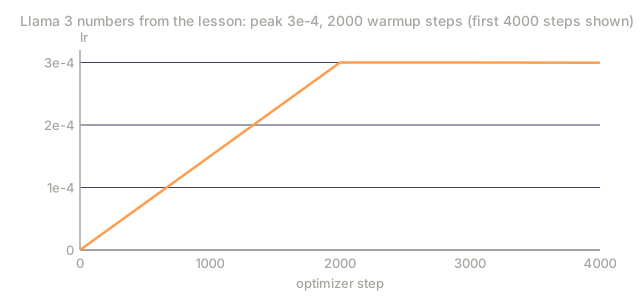
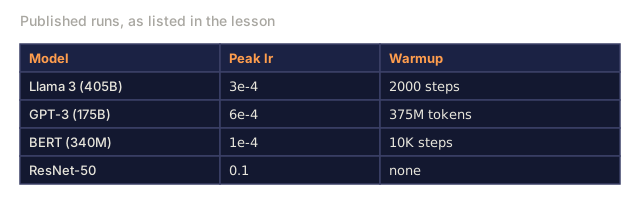
Every major model released in the last three years uses one. Llama 3 ran a peak lr of 3e-4 with 2000 warmup steps and cosine decay down to 3e-5. GPT-3 used lr=6e-4 with warmup spread over 375 million tokens. Neither number is arbitrary — both came out of hyperparameter sweeps that cost millions of dollars to run.
You need to understand schedules because the defaults won't fit your problem. Fine-tuning a pretrained model calls for a different schedule than training from scratch. Bump the batch size and the warmup period has to change with it. And when training breaks at step 10,000, you need to know whether the schedule is the culprit or something else entirely.
The Concept
Constant Learning Rate
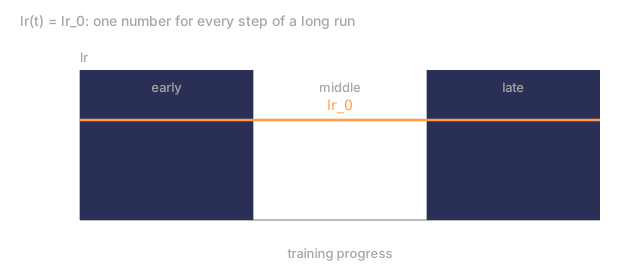
The simplest approach: pick a number and use it for every step.
lr(t) = lr_0
It's rarely optimal. Either it's too high for the end of training, which causes oscillation around the minimum, or it's too low for the beginning, which wastes compute on tiny steps. Fine for small models and quick debugging. A terrible choice for anything that trains longer than an hour.
Step Decay
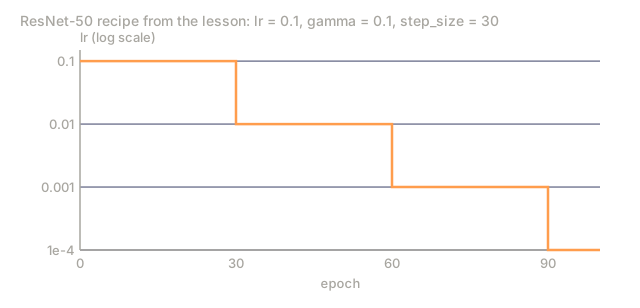
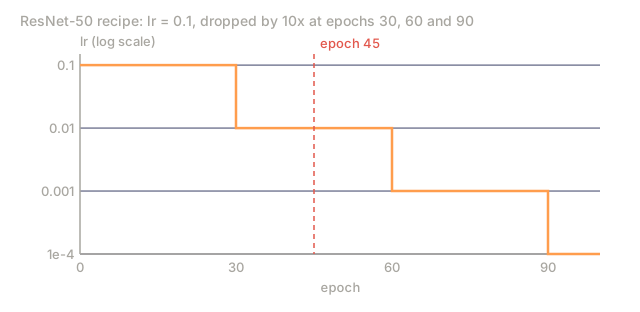
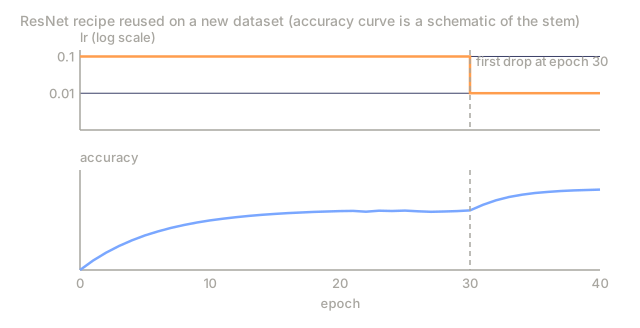
The old-school approach from the ResNet era: cut the learning rate by a factor (usually 10x) at fixed epochs.
lr(t) = lr_0 * gamma^(floor(epoch / step_size))
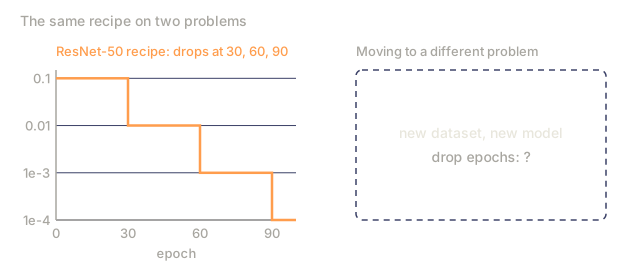
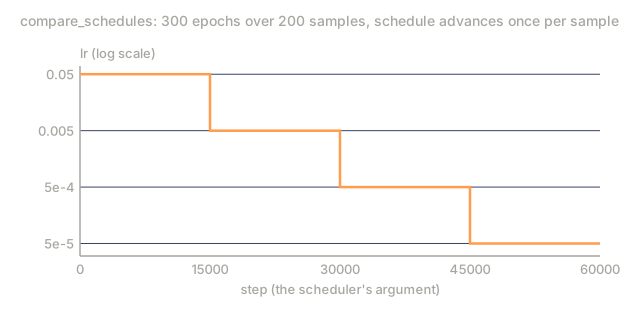
With gamma = 0.1 and step_size = 30, lr drops by 10x every 30 epochs. ResNet-50 used exactly this setup: lr=0.1, dropped by 10x at epochs 30, 60, and 90.
The problem is that the optimal decay points depend on the dataset and architecture, so moving to a different problem means re-tuning when to drop. The transitions are abrupt too, and loss can spike right when the rate changes.
Cosine Annealing
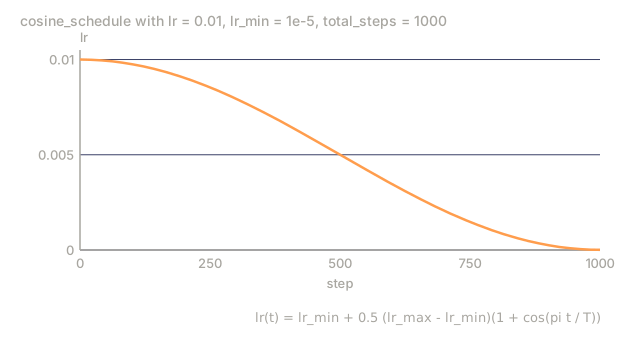
Smooth decay from the maximum learning rate down to a minimum, following a cosine curve:
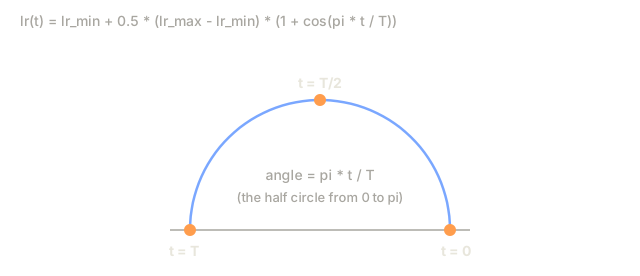
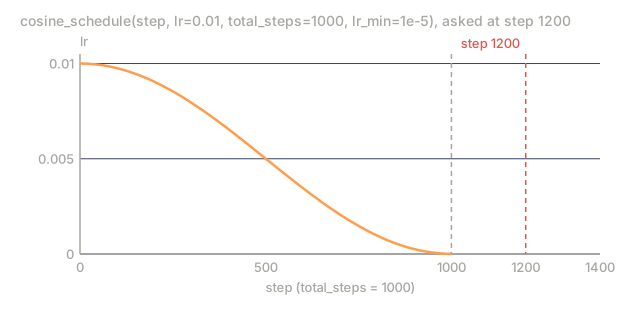
lr(t) = lr_min + 0.5 * (lr_max - lr_min) * (1 + cos(pi * t / T))
Where t is the current step and T is the total number of steps.
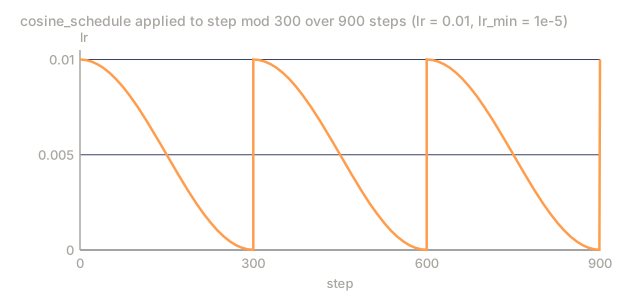
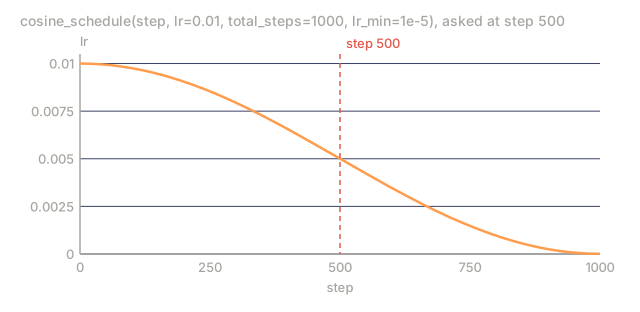
At t=0, the cosine term is 1, so lr = lr_max. At t=T, the cosine term is -1, so lr = lr_min. The decay stays gentle at first, picks up speed through the middle, then eases off again near the end.
This is the default for most modern training runs, and it needs no hyperparameters beyond lr_max and lr_min. The cosine shape matches an empirical observation: most of the learning happens in the middle of training, so that's where you want the step sizes to stay reasonable.
Warmup: Why You Start Small
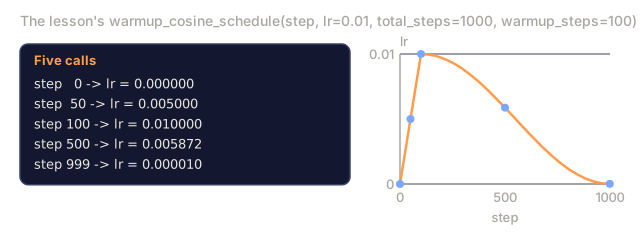
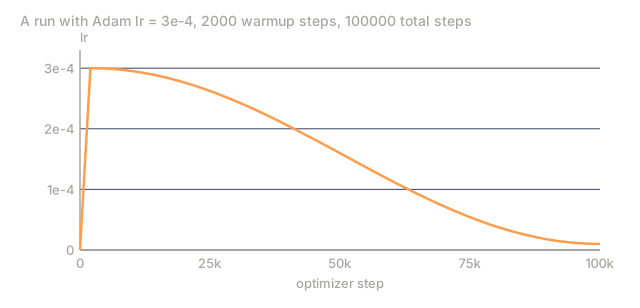
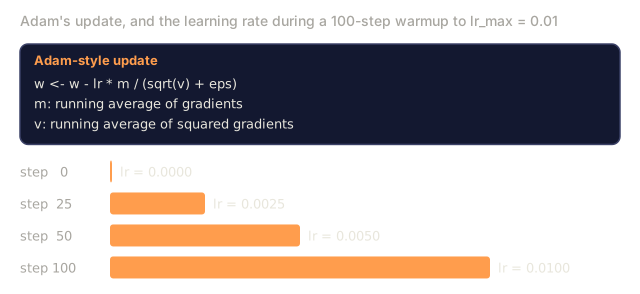
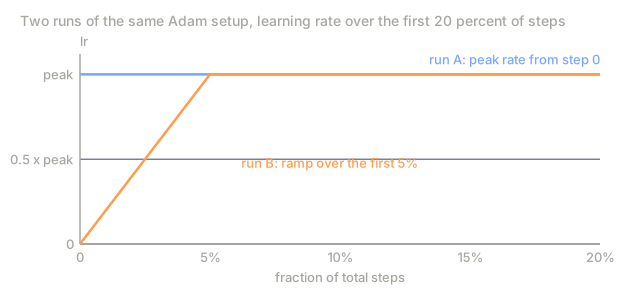
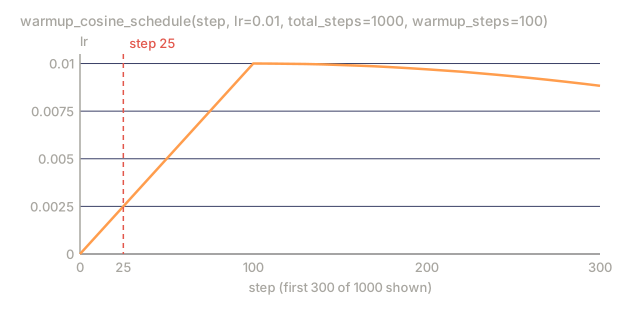
Warmup means starting with a tiny learning rate (often lr_max / warmup_steps, sometimes zero) and ramping it linearly up to lr_max over the first N steps.
lr(t) = lr_max * (t / warmup_steps) for t < warmup_steps
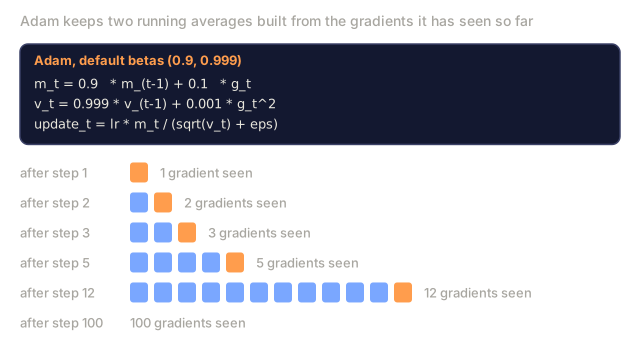
The reason: Adam and other adaptive optimizers keep running estimates of gradient mean and variance. At step 0 those estimates are initialized to zero, so the first few gradient updates are based on garbage statistics. If the learning rate is large during this window, the model takes huge, poorly-directed steps. By the time training reaches the full learning rate, Adam's statistics have already stabilized.
Typical warmup runs 1-5% of total training steps. Llama 3 trained for roughly 1.8 trillion tokens and warmed up for 2000 steps. GPT-3 warmed up over 375 million tokens.
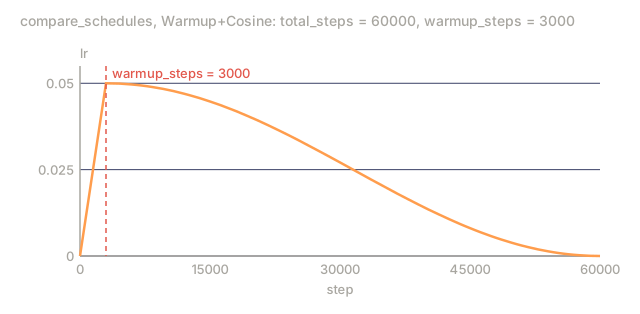
Linear Warmup + Cosine Decay
The modern default: ramp up linearly, then decay with cosine.
if t < warmup_steps:
    lr(t) = lr_max * (t / warmup_steps)
else:
    progress = (t - warmup_steps) / (total_steps - warmup_steps)
    lr(t) = lr_min + 0.5 * (lr_max - lr_min) * (1 + cos(pi * progress))
This is what Llama, GPT, PaLM, and most modern transformers run. Warmup kills the early instability, then cosine decay settles the model into a good minimum.
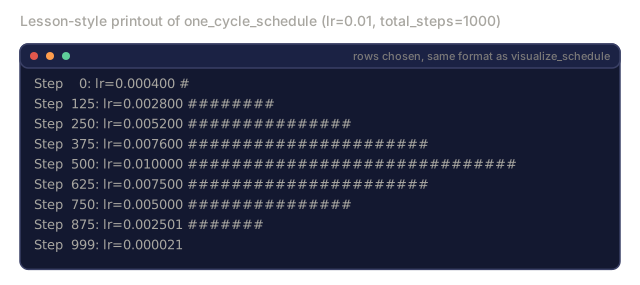
1cycle Policy
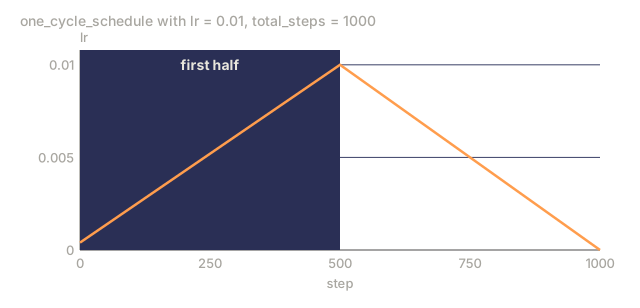
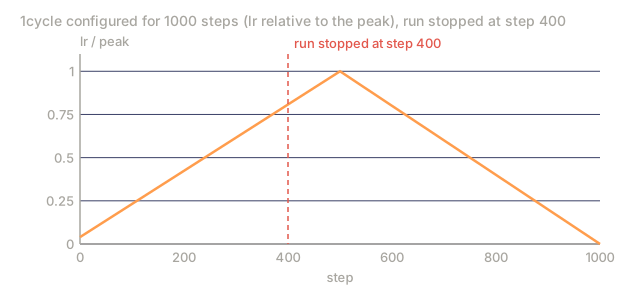
Leslie Smith's discovery (2018): ramp the learning rate up from a low value to a high value in the first half of training, then ramp it back down in the second half. It sounds backwards — why would increasing the learning rate midway through training help anything?
The theory is that a high learning rate acts like regularization, adding noise to the optimization trajectory. During the ramp-up phase the model explores more of the loss landscape and finds better basins. The ramp-down phase then refines within whichever basin it found.
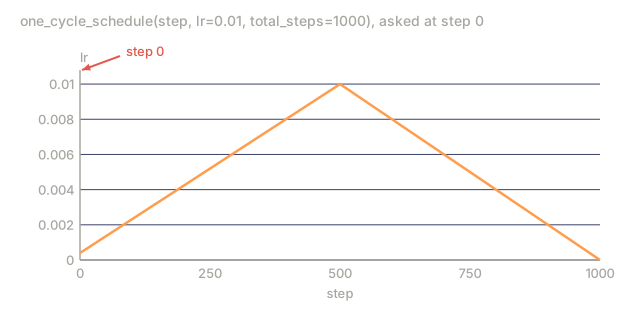
Phase 1 (0 to T/2):    lr ramps from lr_max/25 to lr_max
Phase 2 (T/2 to T):    lr ramps from lr_max to lr_max/10000
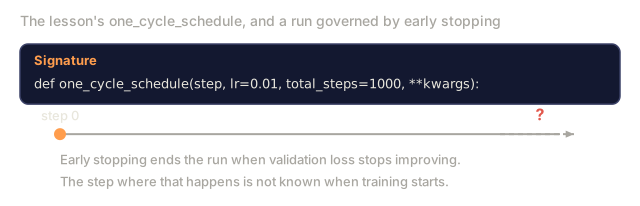
1cycle often trains faster than cosine annealing for the same compute budget. The catch is you need to know the total number of steps ahead of time.
Schedule Shapes

Decision Flowchart

Real Numbers from Published Models

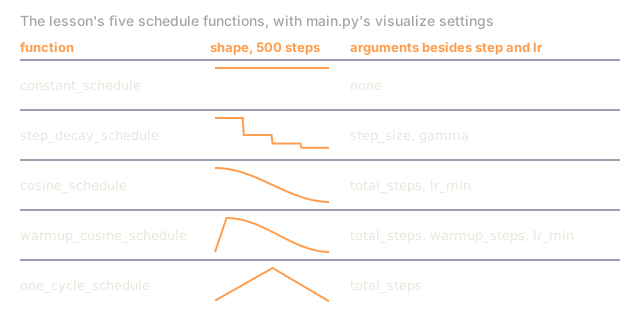
Build It
Step 1: Schedule Functions
Each function takes the current step and returns the learning rate at that step.
import math


def constant_schedule(step, lr=0.01, **kwargs):
    return lr


def step_decay_schedule(step, lr=0.1, step_size=100, gamma=0.1, **kwargs):
    return lr * (gamma ** (step // step_size))


def cosine_schedule(step, lr=0.01, total_steps=1000, lr_min=1e-5, **kwargs):
    if step >= total_steps:
        return lr_min
    return lr_min + 0.5 * (lr - lr_min) * (1 + math.cos(math.pi * step / total_steps))


def warmup_cosine_schedule(step, lr=0.01, total_steps=1000, warmup_steps=100, lr_min=1e-5, **kwargs):
    if total_steps <= warmup_steps:
        return lr * (step / max(warmup_steps, 1))
    if step < warmup_steps:
        return lr * step / warmup_steps
    progress = (step - warmup_steps) / (total_steps - warmup_steps)
    return lr_min + 0.5 * (lr - lr_min) * (1 + math.cos(math.pi * progress))


def one_cycle_schedule(step, lr=0.01, total_steps=1000, **kwargs):
    mid = max(total_steps // 2, 1)
    if step < mid:
        return (lr / 25) + (lr - lr / 25) * step / mid
    else:
        progress = (step - mid) / max(total_steps - mid, 1)
        return lr * (1 - progress) + (lr / 10000) * progress
Step 2: Visualize All Schedules
Print a text-based plot showing how each schedule evolves over training.
def visualize_schedule(name, schedule_fn, total_steps=500, **kwargs):
    steps = list(range(0, total_steps, total_steps // 20))
    if total_steps - 1 not in steps:
        steps.append(total_steps - 1)

    lrs = [schedule_fn(s, total_steps=total_steps, **kwargs) for s in steps]
    max_lr = max(lrs) if max(lrs) > 0 else 1.0

    print(f"\n{name}:")
    for s, lr_val in zip(steps, lrs):
        bar_len = int(lr_val / max_lr * 40)
        bar = "#" * bar_len
        print(f"  Step {s:4d}: lr={lr_val:.6f} {bar}")
Step 3: Training Network
Same two-layer network on the circle dataset as the previous lessons, but now the learning rate changes over training instead of staying fixed.
import random


def sigmoid(x):
    x = max(-500, min(500, x))
    return 1.0 / (1.0 + math.exp(-x))


def relu(x):
    return max(0.0, x)


def relu_deriv(x):
    return 1.0 if x > 0 else 0.0


def make_circle_data(n=200, seed=42):
    random.seed(seed)
    data = []
    for _ in range(n):
        x = random.uniform(-2, 2)
        y = random.uniform(-2, 2)
        label = 1.0 if x * x + y * y < 1.5 else 0.0
        data.append(([x, y], label))
    return data


def train_with_schedule(schedule_fn, schedule_name, data, epochs=300, base_lr=0.05, **kwargs):
    random.seed(0)
    hidden_size = 8
    total_steps = epochs * len(data)

    std = math.sqrt(2.0 / 2)
    w1 = [[random.gauss(0, std) for _ in range(2)] for _ in range(hidden_size)]
    b1 = [0.0] * hidden_size
    w2 = [random.gauss(0, std) for _ in range(hidden_size)]
    b2 = 0.0

    step = 0
    epoch_losses = []

    for epoch in range(epochs):
        total_loss = 0
        correct = 0

        for x, target in data:
            lr = schedule_fn(step, lr=base_lr, total_steps=total_steps, **kwargs)

            z1 = []
            h = []
            for i in range(hidden_size):
                z = w1[i][0] * x[0] + w1[i][1] * x[1] + b1[i]
                z1.append(z)
                h.append(relu(z))

            z2 = sum(w2[i] * h[i] for i in range(hidden_size)) + b2
            out = sigmoid(z2)

            error = out - target
            d_out = error * out * (1 - out)

            for i in range(hidden_size):
                d_h = d_out * w2[i] * relu_deriv(z1[i])
                w2[i] -= lr * d_out * h[i]
                for j in range(2):
                    w1[i][j] -= lr * d_h * x[j]
                b1[i] -= lr * d_h
            b2 -= lr * d_out

            total_loss += (out - target) ** 2
            if (out >= 0.5) == (target >= 0.5):
                correct += 1
            step += 1

        avg_loss = total_loss / len(data)
        accuracy = correct / len(data) * 100
        epoch_losses.append(avg_loss)

    return epoch_losses
Step 4: Compare All Schedules
Train the same network with each schedule and compare final loss and convergence behavior.
def compare_schedules(data):
    configs = [
        ("Constant", constant_schedule, {}),
        ("Step Decay", step_decay_schedule, {"step_size": 15000, "gamma": 0.1}),
        ("Cosine", cosine_schedule, {"lr_min": 1e-5}),
        ("Warmup+Cosine", warmup_cosine_schedule, {"warmup_steps": 3000, "lr_min": 1e-5}),
        ("1cycle", one_cycle_schedule, {}),
    ]

    print(f"\n{'Schedule':<20} {'Start Loss':>12} {'Mid Loss':>12} {'End Loss':>12} {'Best Loss':>12}")
    print("-" * 70)

    for name, schedule_fn, extra_kwargs in configs:
        losses = train_with_schedule(schedule_fn, name, data, epochs=300, base_lr=0.05, **extra_kwargs)
        mid_idx = len(losses) // 2
        best = min(losses)
        print(f"{name:<20} {losses[0]:>12.6f} {losses[mid_idx]:>12.6f} {losses[-1]:>12.6f} {best:>12.6f}")
Step 5: LR Too High vs Too Low
Demonstrate the three failure modes: too high (divergence), too low (crawling), and just right.
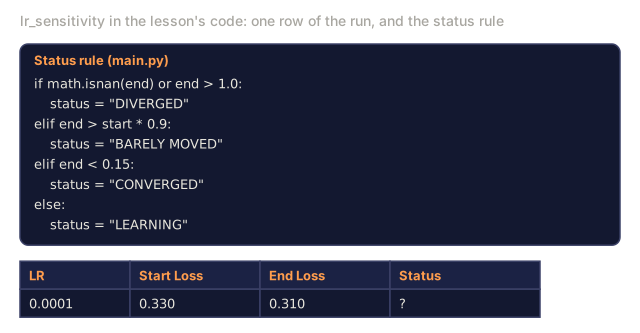
def lr_sensitivity(data):
    learning_rates = [1.0, 0.1, 0.01, 0.001, 0.0001]

    print("\nLR Sensitivity (constant schedule, 100 epochs):")
    print(f"  {'LR':>10} {'Start Loss':>12} {'End Loss':>12} {'Status':>15}")
    print("  " + "-" * 52)

    for lr in learning_rates:
        losses = train_with_schedule(constant_schedule, f"lr={lr}", data, epochs=100, base_lr=lr)
        start = losses[0]
        end = losses[-1]

        if end > start or math.isnan(end) or end > 1.0:
            status = "DIVERGED"
        elif end > start * 0.9:
            status = "BARELY MOVED"
        elif end < 0.15:
            status = "CONVERGED"
        else:
            status = "LEARNING"

        end_str = f"{end:.6f}" if not math.isnan(end) else "NaN"
        print(f"  {lr:>10.4f} {start:>12.6f} {end_str:>12} {status:>15}")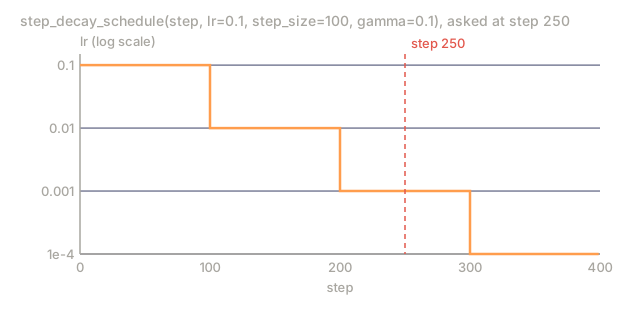
Use It
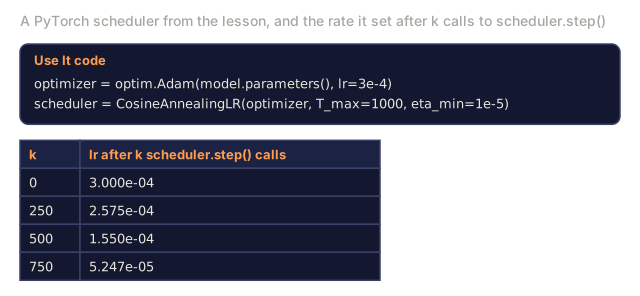
PyTorch ships these schedulers directly in torch.optim.lr_scheduler:
import torch
import torch.optim as optim
from torch.optim.lr_scheduler import CosineAnnealingLR, OneCycleLR, StepLR

model = nn.Sequential(nn.Linear(10, 64), nn.ReLU(), nn.Linear(64, 1))
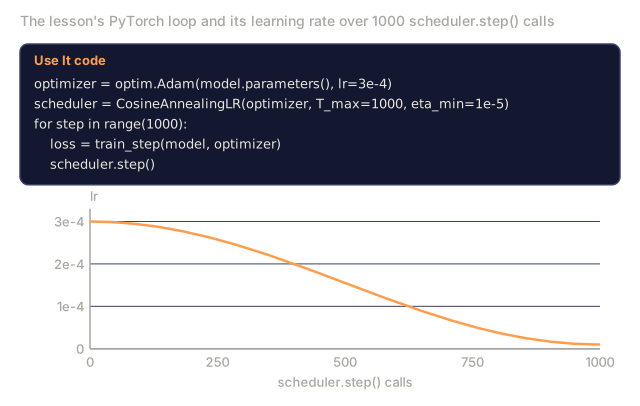
optimizer = optim.Adam(model.parameters(), lr=3e-4)

scheduler = CosineAnnealingLR(optimizer, T_max=1000, eta_min=1e-5)

for step in range(1000):
    loss = train_step(model, optimizer)
    scheduler.step()
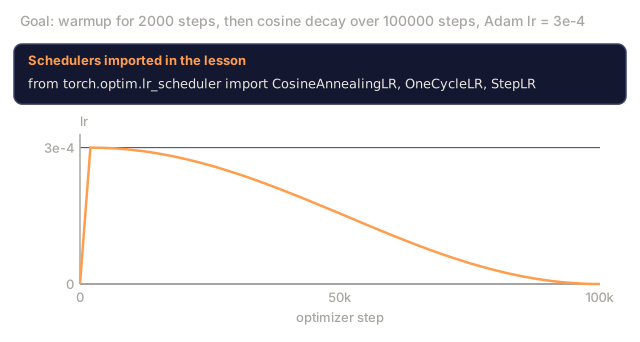
For warmup + cosine, either write a lambda scheduler yourself or grab get_cosine_schedule_with_warmup from HuggingFace:
from transformers import get_cosine_schedule_with_warmup

scheduler = get_cosine_schedule_with_warmup(
    optimizer,
    num_warmup_steps=2000,
    num_training_steps=100000,
)
That HuggingFace function is what most Llama and GPT fine-tuning scripts actually call. When in doubt, use warmup + cosine with a 3-5% warmup fraction of total steps. It covers almost every case you'll run into.
Ship It
This lesson produces:
outputs/prompt-lr-schedule-advisor.md: a prompt that recommends the right learning rate schedule and hyperparameters for your training setup
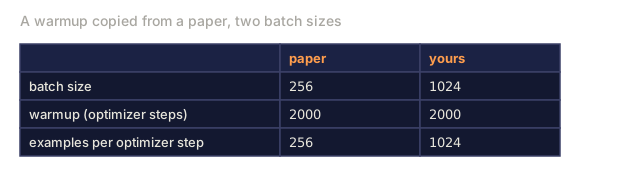
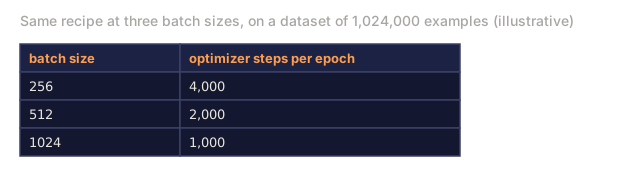
The failure I see most often: someone copies a schedule wholesale out of a paper, changes the batch size, and can't figure out why training got unstable. Warmup is measured in optimizer steps, not epochs, and the number of optimizer steps scales inversely with batch size. Double the batch size and you're taking half as many steps to cover the same warmup window, so a 2000-step warmup that was fine at batch size 256 can be too short at batch size 1024. Tie warmup to a percentage of total steps — 3-5% is a safe default — and recompute it whenever the batch size changes instead of hardcoding a step count.
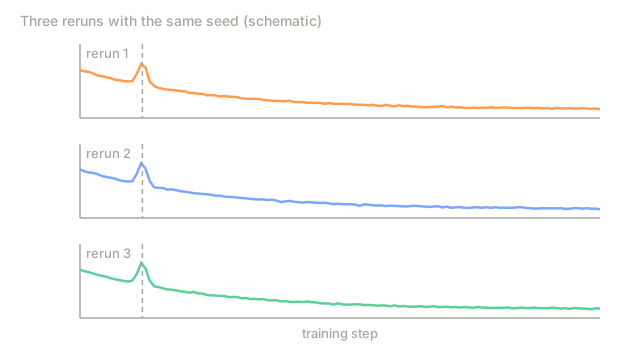
One more debugging heuristic worth keeping: if a loss spike shows up at the exact same step across repeated runs with the same seed, suspect the schedule first, usually the warmup-to-decay handoff or a step-decay boundary. If the spike moves around between runs, that's data or numerical instability, not the schedule. Checking the step number before touching anything else has saved me hours more than once.
Exercises
-
Implement exponential decay: lr(t) = lr_0 * gamma^t where gamma = 0.999. Compare to cosine annealing on the circle dataset.
-
Implement the learning rate range test (Leslie Smith): train for a few hundred steps while exponentially increasing the LR from 1e-7 to 1. Plot loss vs LR. The optimal max LR is just before the loss starts increasing.
-
Train with warmup + cosine but vary the warmup length: 0%, 1%, 5%, 10%, 20% of total steps. Find the sweet spot where training is most stable.
-
Implement cosine annealing with warm restarts (SGDR): reset the learning rate to lr_max every T steps and decay again. Compare to standard cosine on a longer training run.
-
Build a "schedule surgeon" that monitors training loss and automatically switches from warmup to cosine when the loss stabilizes, and reduces lr if the loss plateaus for too long.
Key Terms
| Term | What people say | What it actually means |
|---|---|---|
| Learning rate | "How fast the model learns" | The scalar that multiplies the gradient to determine the parameter update size |
| Schedule | "Change the LR over time" | A function that maps training step to learning rate, designed to optimize convergence |
| Warmup | "Start with a small LR" | Linearly ramping the LR from near-zero to the target value over the first N steps to stabilize optimizer statistics |
| Cosine annealing | "Smooth LR decay" | Decreasing the LR following a cosine curve from lr_max to lr_min over training |
| Step decay | "Drop LR at milestones" | Multiplying the LR by a factor (usually 0.1) at fixed epoch intervals |
| 1cycle policy | "Up then down" | Leslie Smith's method of ramping LR up then down in a single cycle for faster convergence |
| LR range test | "Find the best learning rate" | Training briefly while increasing LR to find the value where loss starts diverging |
| Cosine with warm restarts | "Reset and repeat" | Periodically resetting the LR to lr_max and decaying again (SGDR) |
| Eta min | "The floor for the LR" | The minimum learning rate that the schedule decays to |
| Peak learning rate | "The maximum LR" | The highest LR reached during training, typically after warmup |
Further Reading
- Loshchilov & Hutter, "SGDR: Stochastic Gradient Descent with Warm Restarts" (2017): introduced cosine annealing and warm restarts
- Smith, "Super-Convergence: Very Fast Training of Neural Networks Using Large Learning Rates" (2018): the 1cycle policy paper
- Touvron et al., "Llama 2: Open Foundation and Fine-Tuned Chat Models" (2023): documents the warmup + cosine schedule used at scale
- Goyal et al., "Accurate, Large Minibatch SGD: Training ImageNet in 1 Hour" (2017): linear scaling rule and warmup for large batch training
Code
- main.py (python, 241 lines)