Quantization: Making Models Fit
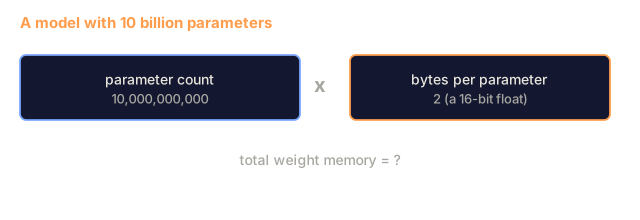
A 70B model in FP16 needs 140GB for weights alone, which is two A100s. FP8 brings it to 70GB on one 80GB card, and INT4 brings it to 35GB, small enough for a MacBook.
Learning Objectives
- Implement symmetric and asymmetric quantization from FP16 to INT8 and INT4, including per-tensor and per-channel scaling
- Calculate the memory savings from quantization and determine which precision fits a given GPU's VRAM
- Explain the difference between post-training quantization (PTQ) and quantization-aware training (QAT)
- Apply GPTQ or AWQ to quantize a real model and measure the accuracy-memory tradeoff on a benchmark
The Problem
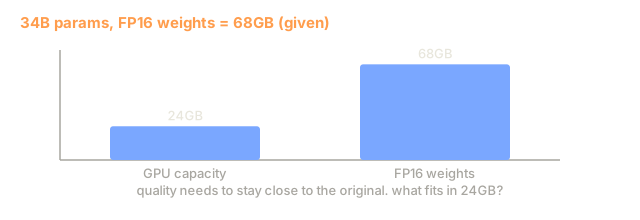
Llama 3 70B has 70 billion parameters, and each one is a 16-bit float. That is 140 billion bytes, or 140GB. A single A100 has 80GB of VRAM, so you cannot load the weights on one card, let alone run inference. You need two A100s at $2/hour each just to serve one model.
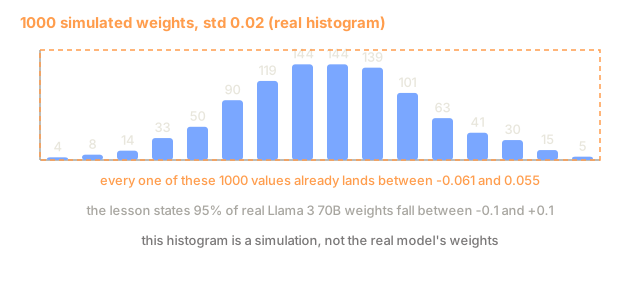
But 16 bits per parameter is wasteful. Most weights cluster near zero, and the full dynamic range of FP16 (from 0.000000059 to 65,504) mostly goes unused. If you measure the weight distribution in Llama 3 70B, 95% of the values fall between -0.1 and +0.1. You are spending 16 bits on values that could fit in 4.
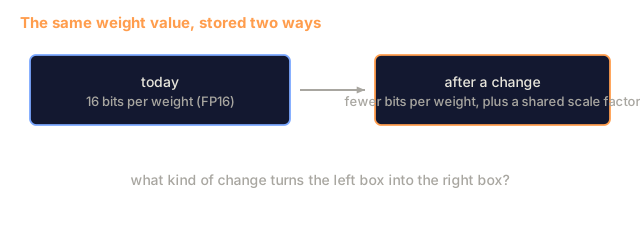
Quantization replaces high-precision numbers with lower-precision ones. FP16 to FP8 halves memory. FP16 to INT4 cuts it to a quarter, so that 140GB model becomes 35GB and fits on a single consumer GPU. Push to 2-bit (aggressive, lossy, but usable for some tasks) and the same model runs on a 16GB laptop.
The cost is accuracy. Each bit you remove throws away information, so the real question is how much you lose and where. A well-quantized INT4 model retains 95-99% of the original's quality on most benchmarks. A naive INT4 quantization can wreck the model. The difference is technique.
Community GPTQ quantizations of Llama 3 to INT4 show roughly 1-2 perplexity points lost on WikiText. Mistral released FP8 checkpoints of Mixtral 8x22B with no measurable quality loss on MMLU. The GGUF format powers llama.cpp, which runs 70B models on MacBooks with M-series chips. Quantization is the standard deployment path for every model larger than 7B, not a hack.
The Concept
Number Formats: What Each Bit Does
A floating-point number has three parts: sign, exponent, and mantissa (also called significand). The sign is one bit. The exponent sets the range (how large or small the number can be). The mantissa sets the precision (how many decimal places you get).
FP32:  [1 sign] [8 exponent] [23 mantissa]  = 32 bits
FP16:  [1 sign] [5 exponent] [10 mantissa]  = 16 bits
BF16:  [1 sign] [8 exponent] [7  mantissa]  = 16 bits
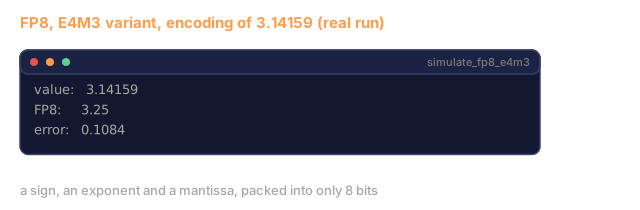
FP8:   [1 sign] [4 exponent] [3  mantissa]  = 8  bits (E4M3)
FP8:   [1 sign] [5 exponent] [2  mantissa]  = 8  bits (E5M2)
INT8:  [1 sign] [7 value]                   = 8  bits (uniform steps)
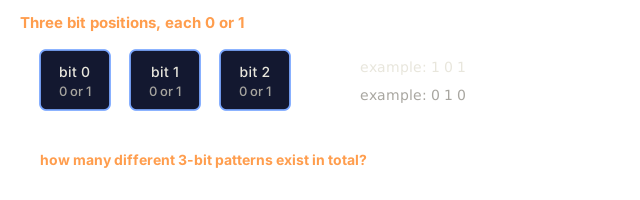
INT4:  [1 sign] [3 value]                   = 4  bits (16 levels total)
FP32 is full precision. 23 mantissa bits give you about 7 decimal digits of precision. Range: roughly 1.2 x 10^-38 to 3.4 x 10^38. Training used to happen exclusively in FP32. It still does for accumulation (running sums during matrix multiplication).
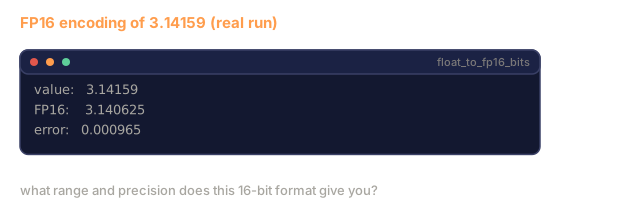
FP16 halves the bits. 10 mantissa bits give about 3.3 decimal digits. The exponent shrinks to 5 bits, reducing the range dramatically (max value ~65,504). This is fine for weights (which cluster near zero) but dangerous for activations and gradients that can spike during training. FP16 training requires loss scaling to prevent underflow.
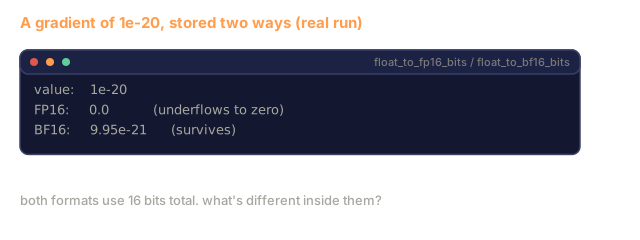
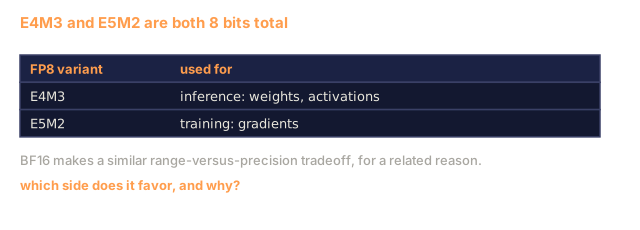
BF16 (Brain Float 16) keeps the 8-bit exponent from FP32 but shrinks the mantissa to 7 bits. Same range as FP32, less precision than FP16. Google designed it specifically for deep learning. The intuition is that range matters more than precision for neural networks. A gradient of 10^-20 that underflows to zero in FP16 survives in BF16. A weight of 0.07342 that rounds to 0.0734 in BF16 is close enough. Every modern training run uses BF16 or a BF16/FP32 mix.
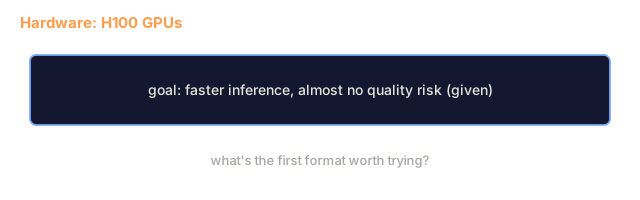
FP8 comes in two flavors. E4M3 (4 exponent, 3 mantissa) is used for weights and activations during inference. E5M2 (5 exponent, 2 mantissa) is used for gradients during training where range matters more than precision. FP8 inference on H100 GPUs achieves 30-50% speedup over FP16 with negligible quality loss.
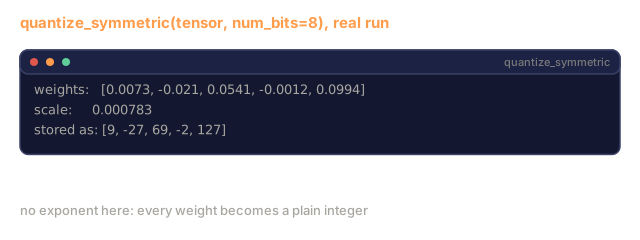
INT8 is an integer format. No exponent, no mantissa. Just 256 evenly spaced values from -128 to 127. You need a scale factor to map floating-point weights into this range. The advantage is that integer arithmetic is faster and more power-efficient than floating-point. INT8 matrix multiplication on an A100 runs at 624 TOPS versus 312 TFLOPS for FP16.
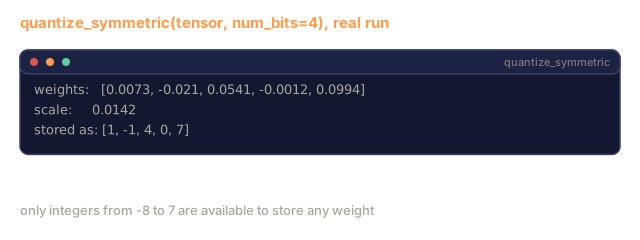
INT4 pushes further. Only 16 possible values. The scale factor carries most of the load, and quality depends on how you choose it and which weights you quantize. State-of-the-art INT4 methods (GPTQ, AWQ) retain 95%+ of original model quality.

How Quantization Works
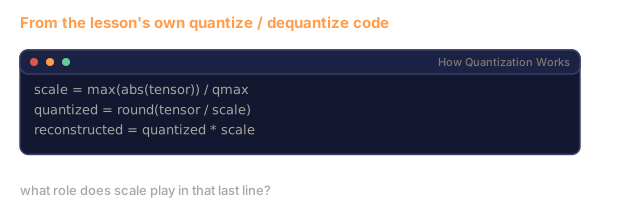
The core operation is simple: find a scale factor, divide the tensor by it, round to the nearest integer, and store the integers plus the scale.
Quantize:
scale = max(abs(tensor)) / max_int_value
quantized = round(tensor / scale)
Dequantize:
reconstructed = quantized * scale
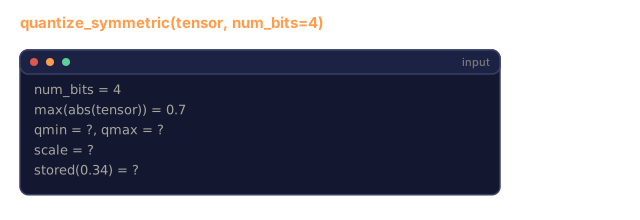
For INT8 with a symmetric range (-127 to 127):
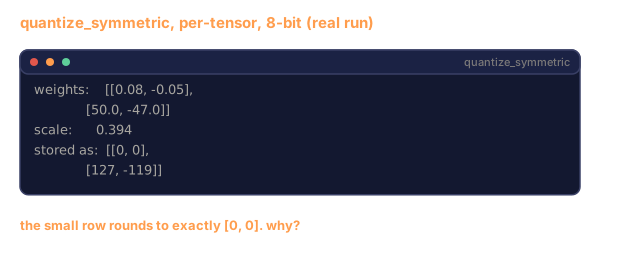
scale = max(abs(tensor)) / 127
quantized = clamp(round(tensor / scale), -128, 127)
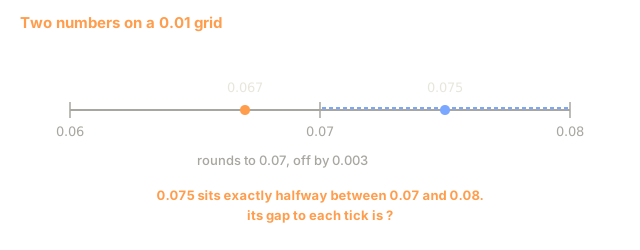
The error is the rounding error. Each value can be off by at most scale / 2. The total error across a layer depends on how many weights you have and how sensitive the model is to perturbations in those weights.
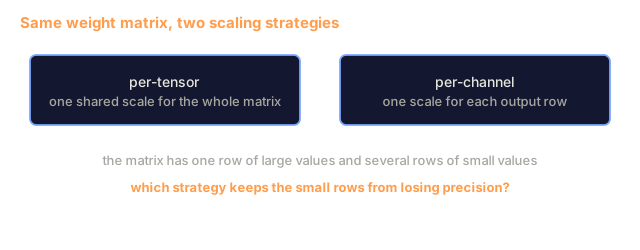
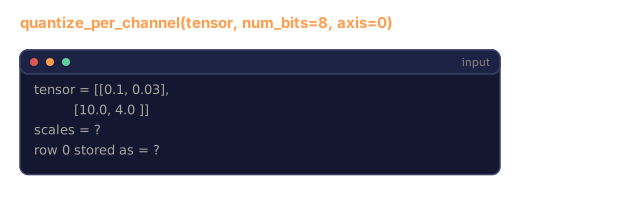
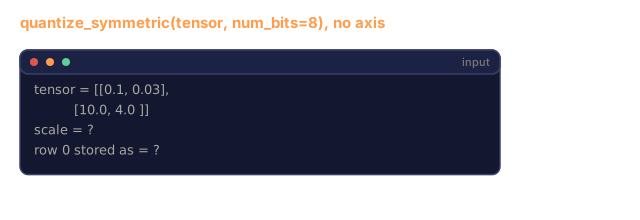
Per-tensor vs per-channel quantization. Per-tensor uses one scale factor for the entire weight matrix. Simple, but if one column has large values and another has small values, the small ones lose most of their precision. Per-channel uses one scale factor per output channel (per row or column of the weight matrix). It costs more (you store N scale factors instead of 1) and gives much better quality. Every production quantization method uses per-channel or finer granularity.
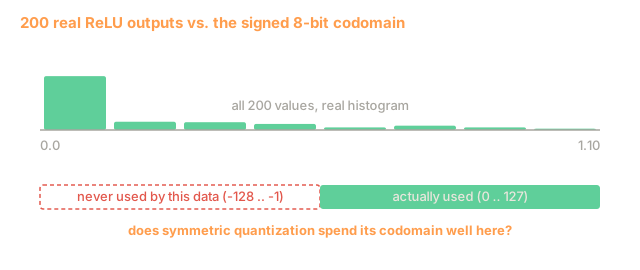
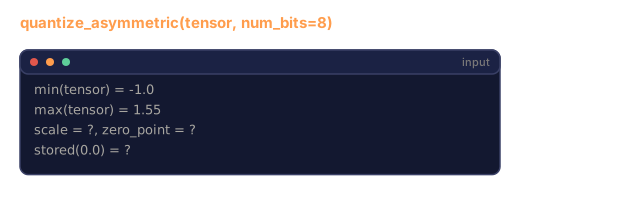
Asymmetric quantization adds a zero-point offset: quantized = round(tensor / scale) + zero_point. This handles distributions that are not centered at zero. ReLU activations, for example, are always non-negative. Symmetric quantization wastes half the integer range on negative values that never appear. Asymmetric quantization maps the actual range [min, max] to the full integer range.
Sensitivity Hierarchy
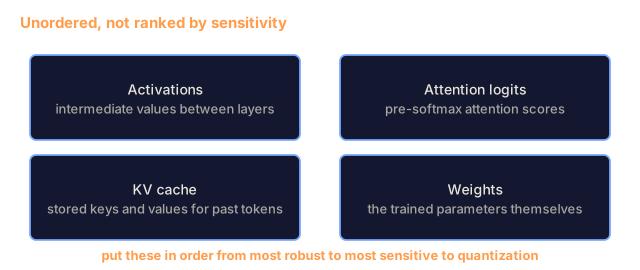
Parts of a model tolerate quantization unevenly, and the order is fairly consistent.
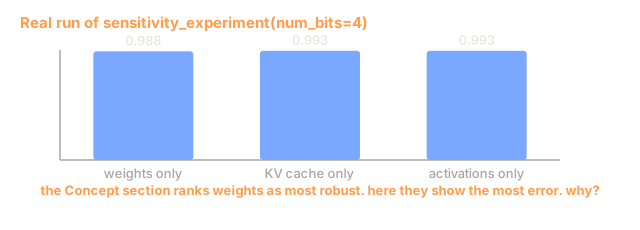
Weights (most robust). Model weights change slowly during training and follow a roughly Gaussian distribution centered near zero. They quantize well. INT8 weights with per-channel scales produce nearly lossless results. INT4 needs more sophisticated methods but works.
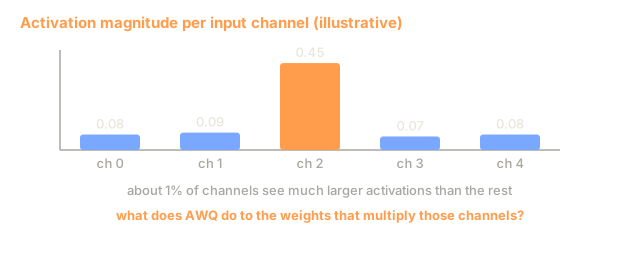
Activations (moderate sensitivity). Activations are the intermediate values flowing through the network during inference. They have wider dynamic range than weights and contain outliers. A single attention head might produce activation values 100x larger than the mean. These outliers matter for quality, and quantizing them naively throws that information away. Solutions: keep outlier channels in higher precision (LLM.int8()), use per-token or per-channel activation scales.
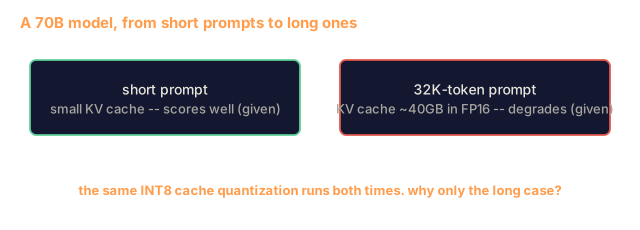
KV cache (high sensitivity). The key-value cache stores attention states for all previous tokens. At long context lengths, the KV cache dominates memory. For a 70B model at 32K context, the KV cache alone is 40GB in FP16. Quantizing the KV cache to FP8 or INT8 saves a lot of memory, but error compounds across future attention computations. The quality impact scales with sequence length.
Attention logits (most sensitive). The softmax in attention is highly sensitive to small changes in its inputs. A quantization error of 0.01 in a pre-softmax logit can shift the attention distribution meaningfully. Most quantization schemes keep attention computation in higher precision (FP16 or BF16) even when everything else is quantized.

PTQ vs QAT
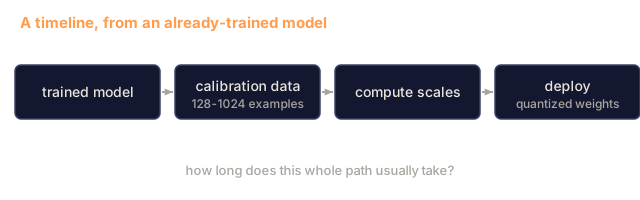
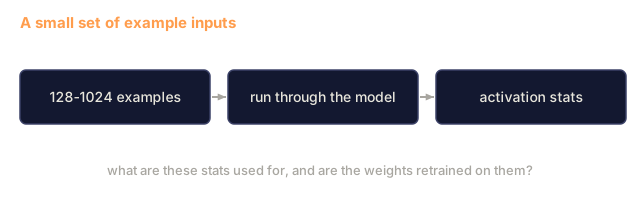
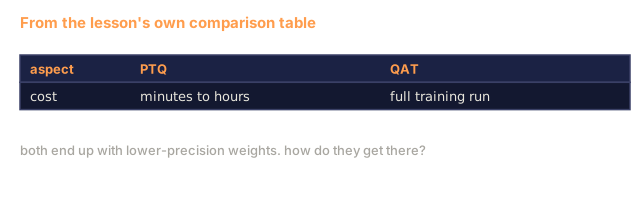
Post-Training Quantization (PTQ) quantizes an already-trained model. No retraining. You take the FP16 weights, compute scale factors, round, and deploy. Fast (minutes to hours) and cheap. Works well for INT8 and FP8. For INT4, naive PTQ often fails badly because rounding errors accumulate. Advanced PTQ methods (GPTQ, AWQ) use calibration data to minimize the quantization error.
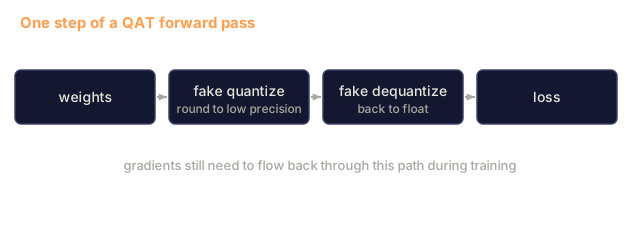
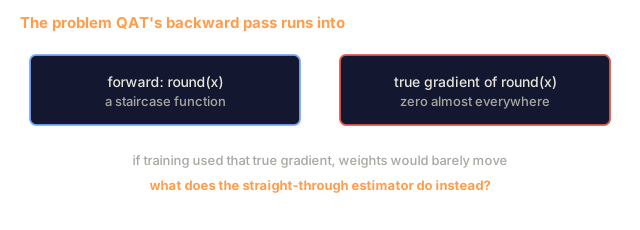
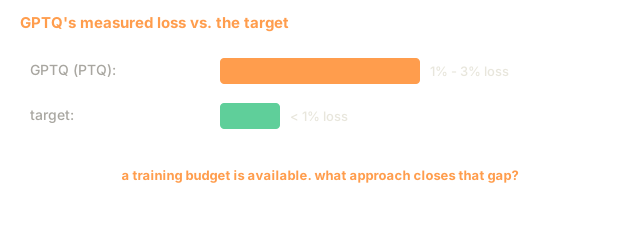
Quantization-Aware Training (QAT) inserts fake quantization operations into the forward pass during training. The model learns to place its weights where rounding errors are small. Gradients flow through the fake quantization using the straight-through estimator (STE): pretend the rounding operation has gradient 1. QAT produces better INT4 and INT2 models than PTQ but requires a full training run. Google used QAT for Gemini's efficient serving. Meta used QAT for some Llama deployment targets.
| Aspect | PTQ | QAT |
|---|---|---|
| Cost | Minutes to hours | Full training run |
| Quality at INT8 | Excellent (< 0.1% loss) | Excellent |
| Quality at INT4 | Good with GPTQ/AWQ (1-3% loss) | Better (< 1% loss) |
| Quality at INT2 | Poor | Usable for some tasks |
| Calibration data | 128-1024 examples | Full training dataset |
| When to use | Deployment, iteration | Maximum quality at low bit-width |
GPTQ, AWQ, GGUF
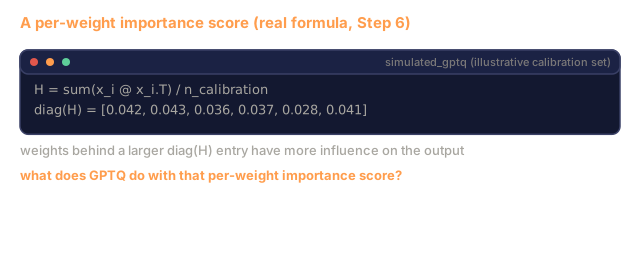
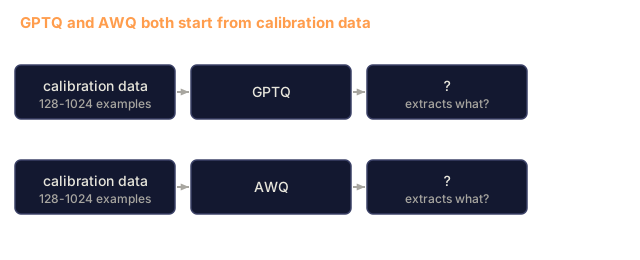
GPTQ (GPT Quantization) is a one-shot PTQ method. It quantizes weights one layer at a time, using a small calibration dataset (128 examples is typical) to measure the Hessian (second-order information about how sensitive the output is to each weight). Weights that the Hessian says are important get quantized more carefully. GPTQ was the first method to make INT4 quantization practical for LLMs. TheBloke on Hugging Face popularized GPTQ by releasing quantized versions of hundreds of models.
AWQ (Activation-Aware Weight Quantization) observes that a small fraction of weights (about 1%) are disproportionately important because they multiply with large activation values. AWQ identifies these salient weights using calibration data and scales them up before quantization (then scales the corresponding activations down). This keeps the important weights in a range where INT4 quantization is accurate. AWQ typically matches or slightly beats GPTQ quality while being 1.5-2x faster to apply.
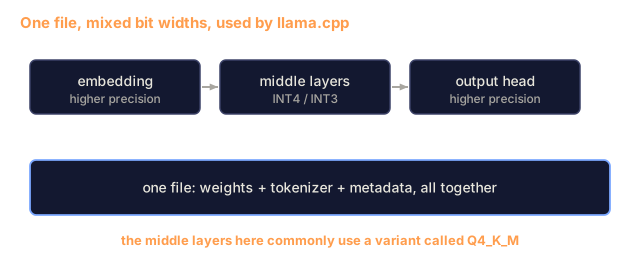
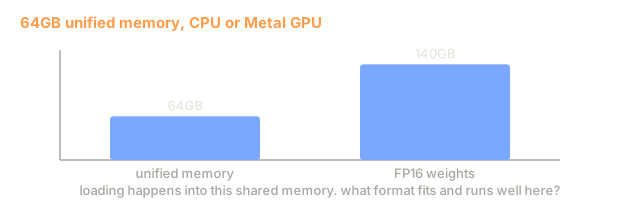
GGUF (GPT-Generated Unified Format) is the file format used by llama.cpp and its ecosystem. It supports mixed quantization: different layers get different bit widths. The first and last layers (embedding and output head) are typically kept at higher precision. Middle layers get INT4 or INT3. GGUF files are self-contained: weights, tokenizer, metadata all in one file. The format is designed for CPU inference and Apple Silicon, where loading the entire model into memory and running matrix multiplications on the CPU or Metal GPU is the standard path. Q4_K_M is the most popular GGUF quantization variant, balancing quality and size.

Quality Measurement
How do you know if your quantized model is still good?
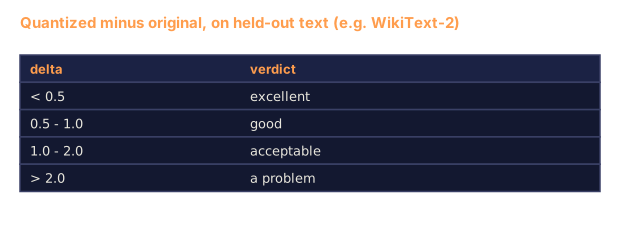
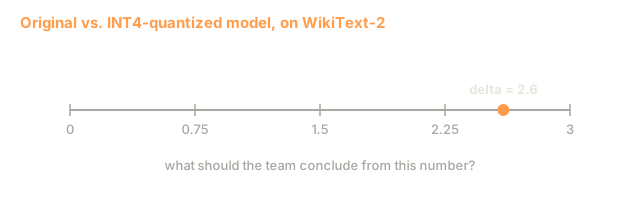
Perplexity. The most common metric. Lower is better. Compute perplexity on a held-out dataset (WikiText-2 is standard) for both the original and quantized model. The delta tells you how much information the quantization destroyed. Rules of thumb: delta < 0.5 is excellent, 0.5-1.0 is good, 1.0-2.0 is acceptable for most tasks, > 2.0 means something went wrong.
Task-specific benchmarks. Run the quantized model on MMLU, HumanEval, GSM8K, or your custom eval suite. Compare against the original. Quantization affects different capabilities unevenly. Math and code tasks are more sensitive to precision loss than general knowledge.
Output comparison. Generate responses from both models on the same prompts and compare. LLM-as-judge (Lesson 10) works well here. Compute a win rate: what fraction of prompts does the quantized model match or beat the original on?
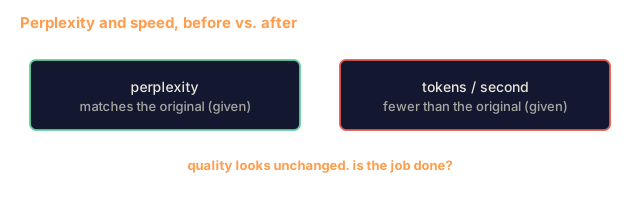
Latency and throughput. Quantization exists to make models faster and cheaper. Measure tokens per second, time to first token, and memory usage. A quantized model that runs slower than the original has failed at its job.
| Model | Format | Size | Perplexity (WikiText-2) | MMLU | Tokens/sec (A100) |
|---|---|---|---|---|---|
| Llama 3 70B | FP16 | 140GB | 3.12 | 79.5% | 38 |
| Llama 3 70B | FP8 | 70GB | 3.14 | 79.3% | 55 |
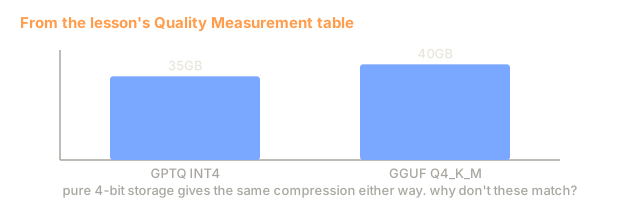
| Llama 3 70B | GPTQ INT4 | 35GB | 4.32 | 77.8% | 72 |
| Llama 3 70B | AWQ INT4 | 35GB | 4.18 | 78.1% | 75 |
| Llama 3 70B | GGUF Q4_K_M | 40GB | 4.25 | 77.9% | 28 (CPU) |
The pattern: FP8 is nearly free. INT4 costs 1-2 MMLU points but doubles throughput and quarters memory. The tradeoff is worth it for most deployments.
Real Numbers
FP16 to FP8 on H100: 30-50% inference speedup, < 0.1% quality loss. This is the easy win, and I'd turn it on for any H100 deployment.
FP16 to INT8 (LLM.int8()): 2x memory reduction, < 0.5% quality loss. The mixed-precision approach keeps outlier features in FP16 while quantizing everything else to INT8.
FP16 to INT4 (GPTQ/AWQ): 4x memory reduction, 1-3% quality loss depending on the model and method. Enables 70B models on a single 48GB GPU.
FP16 to INT4 (GGUF Q4_K_M): 3.5x memory reduction, 1-2% quality loss. Optimized for CPU inference. A 70B model at Q4_K_M is about 40GB and runs at 10-15 tokens/second on an M3 Max with 64GB.
FP16 to INT2: 8x memory reduction, 5-15% quality loss. Only viable for specific narrow tasks where you can tolerate degradation. Research frontier, not production-ready for general use.
Build It
Step 1: Number Format Representations
Build the bit-level representation of each format to see exactly what sign, exponent, and mantissa do.
import numpy as np


def float_to_fp32_bits(value):
    bits = np.float32(value).view(np.uint32)
    sign = (bits >> 31) & 1
    exponent = (bits >> 23) & 0xFF
    mantissa = bits & 0x7FFFFF
    return {"sign": int(sign), "exponent": int(exponent), "mantissa": int(mantissa),
            "exponent_bits": format(int(exponent), '08b'),
            "mantissa_bits": format(int(mantissa), '023b'),
            "value": float(value),
            "actual_exponent": int(exponent) - 127}


def float_to_fp16_bits(value):
    fp16 = np.float16(value)
    bits = fp16.view(np.uint16)
    sign = (bits >> 15) & 1
    exponent = (bits >> 10) & 0x1F
    mantissa = bits & 0x3FF
    return {"sign": int(sign), "exponent": int(exponent), "mantissa": int(mantissa),
            "exponent_bits": format(int(exponent), '05b'),
            "mantissa_bits": format(int(mantissa), '010b'),
            "value": float(fp16),
            "actual_exponent": int(exponent) - 15}


def float_to_bf16_bits(value):
    fp32_bits = np.float32(value).view(np.uint32)
    bf16_bits = (fp32_bits >> 16).astype(np.uint16)
    sign = (bf16_bits >> 15) & 1
    exponent = (bf16_bits >> 7) & 0xFF
    mantissa = bf16_bits & 0x7F
    reconstructed = np.uint32(bf16_bits.astype(np.uint32) << 16).view(np.float32)
    return {"sign": int(sign), "exponent": int(exponent), "mantissa": int(mantissa),
            "exponent_bits": format(int(exponent), '08b'),
            "mantissa_bits": format(int(mantissa), '07b'),
            "value": float(reconstructed),
            "actual_exponent": int(exponent) - 127}


def simulate_fp8_e4m3(value):
    sign = 1 if value < 0 else 0
    abs_val = abs(value)
    max_val = 448.0
    abs_val = min(abs_val, max_val)
    if abs_val == 0:
        return {"sign": sign, "exponent": 0, "mantissa": 0, "value": 0.0,
                "exponent_bits": "0000", "mantissa_bits": "000"}
    exp = int(np.floor(np.log2(abs_val)))
    exp = max(-6, min(8, exp))
    mantissa_val = abs_val / (2.0 ** exp) - 1.0
    mantissa_quant = round(mantissa_val * 8) / 8
    mantissa_quant = max(0, min(0.875, mantissa_quant))
    reconstructed = (1.0 + mantissa_quant) * (2.0 ** exp)
    if sign:
        reconstructed = -reconstructed
    mantissa_int = int(round(mantissa_quant * 8))
    return {"sign": sign, "exponent": exp + 7, "mantissa": mantissa_int,
            "exponent_bits": format(exp + 7, '04b'),
            "mantissa_bits": format(mantissa_int, '03b'),
            "value": float(reconstructed),
            "actual_exponent": exp}


def display_format_comparison(value):
    fp32 = float_to_fp32_bits(value)
    fp16 = float_to_fp16_bits(value)
    bf16 = float_to_bf16_bits(value)
    fp8 = simulate_fp8_e4m3(value)

    print(f"\n  Value: {value}")
    print(f"  {'Format':<8} {'Stored Value':>14} {'Error':>12} {'Sign':>5} {'Exp Bits':>10} {'Man Bits':>25}")
    print(f"  {'-'*76}")
    print(f"  {'FP32':<8} {fp32['value']:>14.6f} {abs(fp32['value'] - value):>12.8f} {fp32['sign']:>5} {fp32['exponent_bits']:>10} {fp32['mantissa_bits']:>25}")
    print(f"  {'FP16':<8} {fp16['value']:>14.6f} {abs(fp16['value'] - value):>12.8f} {fp16['sign']:>5} {fp16['exponent_bits']:>10} {fp16['mantissa_bits']:>25}")
    print(f"  {'BF16':<8} {bf16['value']:>14.6f} {abs(bf16['value'] - value):>12.8f} {bf16['sign']:>5} {bf16['exponent_bits']:>10} {bf16['mantissa_bits']:>25}")
    print(f"  {'FP8e4m3':<8} {fp8['value']:>14.6f} {abs(fp8['value'] - value):>12.8f} {fp8['sign']:>5} {fp8['exponent_bits']:>10} {fp8['mantissa_bits']:>25}")
Step 2: Symmetric Quantization (Per-Tensor and Per-Channel)
The fundamental quantization operations. Per-tensor uses one scale for the whole matrix. Per-channel uses one scale per row or column.
def quantize_symmetric(tensor, num_bits=8):
    qmin = -(2 ** (num_bits - 1))
    qmax = 2 ** (num_bits - 1) - 1
    abs_max = np.max(np.abs(tensor))
    if abs_max == 0:
        return np.zeros_like(tensor, dtype=np.int32), 1.0
    scale = abs_max / qmax
    quantized = np.clip(np.round(tensor / scale), qmin, qmax).astype(np.int32)
    return quantized, float(scale)


def dequantize_symmetric(quantized, scale):
    return quantized.astype(np.float64) * scale


def quantize_per_channel(tensor, num_bits=8, axis=0):
    qmin = -(2 ** (num_bits - 1))
    qmax = 2 ** (num_bits - 1) - 1

    if axis == 0:
        abs_max = np.max(np.abs(tensor), axis=1, keepdims=True)
    else:
        abs_max = np.max(np.abs(tensor), axis=0, keepdims=True)

    abs_max = np.where(abs_max == 0, 1.0, abs_max)
    scales = abs_max / qmax
    quantized = np.clip(np.round(tensor / scales), qmin, qmax).astype(np.int32)
    return quantized, scales.squeeze()


def dequantize_per_channel(quantized, scales, axis=0):
    if axis == 0:
        return quantized.astype(np.float64) * scales.reshape(-1, 1)
    else:
        return quantized.astype(np.float64) * scales.reshape(1, -1)


def quantize_asymmetric(tensor, num_bits=8):
    qmin = 0
    qmax = 2 ** num_bits - 1
    t_min = np.min(tensor)
    t_max = np.max(tensor)
    if t_max == t_min:
        return np.zeros_like(tensor, dtype=np.int32), 1.0, 0
    scale = (t_max - t_min) / (qmax - qmin)
    zero_point = int(np.round(qmin - t_min / scale))
    zero_point = max(qmin, min(qmax, zero_point))
    quantized = np.clip(np.round(tensor / scale + zero_point), qmin, qmax).astype(np.int32)
    return quantized, float(scale), int(zero_point)


def dequantize_asymmetric(quantized, scale, zero_point):
    return (quantized.astype(np.float64) - zero_point) * scale
Step 3: Quality Measurement
Measure how much information quantization destroys. Mean squared error, signal-to-noise ratio, and cosine similarity between original and reconstructed tensors.
def quantization_error(original, reconstructed):
    diff = original - reconstructed
    mse = float(np.mean(diff ** 2))
    rmse = float(np.sqrt(mse))
    max_error = float(np.max(np.abs(diff)))
    signal_power = float(np.mean(original ** 2))
    snr_db = 10 * np.log10(signal_power / max(mse, 1e-20))

    orig_flat = original.flatten()
    recon_flat = reconstructed.flatten()
    norm_orig = np.linalg.norm(orig_flat)
    norm_recon = np.linalg.norm(recon_flat)
    if norm_orig == 0 or norm_recon == 0:
        cosine_sim = 0.0
    else:
        cosine_sim = float(np.dot(orig_flat, recon_flat) / (norm_orig * norm_recon))

    return {"mse": mse, "rmse": rmse, "max_error": max_error,
            "snr_db": float(snr_db), "cosine_similarity": cosine_sim}


def compare_quantization_methods(tensor, num_bits=8):
    q_pt, s_pt = quantize_symmetric(tensor, num_bits)
    recon_pt = dequantize_symmetric(q_pt, s_pt)
    err_pt = quantization_error(tensor, recon_pt)

    q_pc, s_pc = quantize_per_channel(tensor, num_bits, axis=0)
    recon_pc = dequantize_per_channel(q_pc, s_pc, axis=0)
    err_pc = quantization_error(tensor, recon_pc)

    q_asym, s_asym, zp = quantize_asymmetric(tensor, num_bits)
    recon_asym = dequantize_asymmetric(q_asym, s_asym, zp)
    err_asym = quantization_error(tensor, recon_asym)

    print(f"\n  Quantization Comparison ({num_bits}-bit, tensor shape {tensor.shape}):")
    print(f"  {'Method':<20} {'MSE':>12} {'SNR (dB)':>10} {'Cosine Sim':>12} {'Max Error':>12}")
    print(f"  {'-'*68}")
    print(f"  {'Per-tensor sym':<20} {err_pt['mse']:>12.8f} {err_pt['snr_db']:>10.2f} {err_pt['cosine_similarity']:>12.8f} {err_pt['max_error']:>12.8f}")
    print(f"  {'Per-channel sym':<20} {err_pc['mse']:>12.8f} {err_pc['snr_db']:>10.2f} {err_pc['cosine_similarity']:>12.8f} {err_pc['max_error']:>12.8f}")
    print(f"  {'Asymmetric':<20} {err_asym['mse']:>12.8f} {err_asym['snr_db']:>10.2f} {err_asym['cosine_similarity']:>12.8f} {err_asym['max_error']:>12.8f}")

    return {"per_tensor": err_pt, "per_channel": err_pc, "asymmetric": err_asym}
Step 4: Bit-Width Sweep
Quantize the same tensor at different bit widths (2, 3, 4, 8, 16) and measure quality at each level. This shows where the quality cliff sits.
def bit_width_sweep(tensor):
    print(f"\n  Bit-Width Sweep (tensor shape {tensor.shape}):")
    print(f"  {'Bits':>6} {'Levels':>8} {'MSE':>14} {'SNR (dB)':>10} {'Cosine Sim':>12} {'Compression':>12}")
    print(f"  {'-'*64}")

    results = []
    for bits in [2, 3, 4, 8, 16]:
        q, s = quantize_per_channel(tensor, bits, axis=0)
        recon = dequantize_per_channel(q, s, axis=0)
        err = quantization_error(tensor, recon)
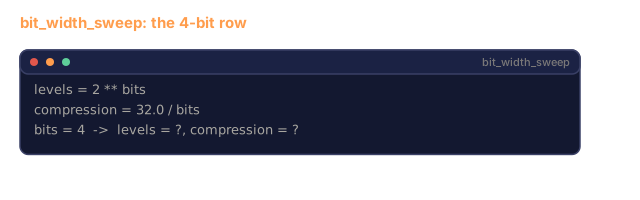
        levels = 2 ** bits
        compression = 32.0 / bits

        print(f"  {bits:>6} {levels:>8} {err['mse']:>14.8f} {err['snr_db']:>10.2f} {err['cosine_similarity']:>12.8f} {compression:>11.1f}x")
        results.append({"bits": bits, "levels": levels, "error": err, "compression": compression})

    return results
Step 5: Sensitivity Experiment
Simulate quantizing different parts of one transformer layer and measure how much error each adds. Weights, activations, and the KV cache are quantized per channel. Attention logits get 5% Gaussian noise as a stand-in, since the softmax inputs are not stored as integers here.
def simulate_transformer_layer(input_data, weights, kv_scale=1.0):
    hidden = input_data @ weights["qkv"]
    seq_len = hidden.shape[1]
    d_model = weights["qkv"].shape[1] // 3
    q, k, v = hidden[:, :, :d_model], hidden[:, :, d_model:2*d_model], hidden[:, :, 2*d_model:]

    attn_scores = (q @ k.transpose(0, 2, 1)) / np.sqrt(d_model) * kv_scale
    attn_max = np.max(attn_scores, axis=-1, keepdims=True)
    attn_exp = np.exp(attn_scores - attn_max)
    attn_weights = attn_exp / np.sum(attn_exp, axis=-1, keepdims=True)

    attn_output = attn_weights @ v
    output = attn_output @ weights["out"]
    return output, {"q": q, "k": k, "v": v, "attn_scores": attn_scores,
                    "attn_weights": attn_weights, "attn_output": attn_output}


def sensitivity_experiment(batch_size=2, seq_len=16, d_model=64, num_bits=8):
    np.random.seed(42)
    input_data = np.random.randn(batch_size, seq_len, d_model) * 0.1

    weights = {
        "qkv": np.random.randn(d_model, 3 * d_model) * (2.0 / d_model) ** 0.5,
        "out": np.random.randn(d_model, d_model) * (2.0 / d_model) ** 0.5,
    }

    baseline_output, baseline_internals = simulate_transformer_layer(input_data, weights)

    experiments = {}

    q_qkv, s_qkv = quantize_per_channel(weights["qkv"], num_bits, axis=0)
    q_out, s_out = quantize_per_channel(weights["out"], num_bits, axis=0)
    quantized_weights = {
        "qkv": dequantize_per_channel(q_qkv, s_qkv, axis=0),
        "out": dequantize_per_channel(q_out, s_out, axis=0),
    }
    weight_quant_output, _ = simulate_transformer_layer(input_data, quantized_weights)
    experiments["Weights only"] = quantization_error(baseline_output, weight_quant_output)

    _, fresh_internals = simulate_transformer_layer(input_data, weights)
    q_act, s_act = quantize_per_channel(
        fresh_internals["attn_output"].reshape(-1, d_model), num_bits, axis=0
    )
    quant_attn_out = dequantize_per_channel(q_act, s_act, axis=0).reshape(batch_size, seq_len, d_model)
    act_quant_output = quant_attn_out @ weights["out"]
    experiments["Activations only"] = quantization_error(baseline_output, act_quant_output)

    q_k, s_k = quantize_per_channel(fresh_internals["k"].reshape(-1, d_model), num_bits, axis=0)
    q_v, s_v = quantize_per_channel(fresh_internals["v"].reshape(-1, d_model), num_bits, axis=0)
    quant_k = dequantize_per_channel(q_k, s_k, axis=0).reshape(batch_size, seq_len, d_model)
    quant_v = dequantize_per_channel(q_v, s_v, axis=0).reshape(batch_size, seq_len, d_model)
    attn_scores_kv = (fresh_internals["q"] @ quant_k.transpose(0, 2, 1)) / np.sqrt(d_model)
    attn_max_kv = np.max(attn_scores_kv, axis=-1, keepdims=True)
    attn_exp_kv = np.exp(attn_scores_kv - attn_max_kv)
    attn_weights_kv = attn_exp_kv / np.sum(attn_exp_kv, axis=-1, keepdims=True)
    kv_quant_output = (attn_weights_kv @ quant_v) @ weights["out"]
    experiments["KV cache only"] = quantization_error(baseline_output, kv_quant_output)

    noise_scale = np.std(fresh_internals["attn_scores"]) * 0.05
    noisy_scores = fresh_internals["attn_scores"] + np.random.randn(*fresh_internals["attn_scores"].shape) * noise_scale
    noisy_max = np.max(noisy_scores, axis=-1, keepdims=True)
    noisy_exp = np.exp(noisy_scores - noisy_max)
    noisy_weights = noisy_exp / np.sum(noisy_exp, axis=-1, keepdims=True)
    attn_quant_output = (noisy_weights @ fresh_internals["v"]) @ weights["out"]
    experiments["Attention logits (5% noise)"] = quantization_error(baseline_output, attn_quant_output)

    print(f"\n  Sensitivity Experiment ({num_bits}-bit quantization):")
    print(f"  {'Component':<30} {'MSE':>14} {'SNR (dB)':>10} {'Cosine Sim':>12}")
    print(f"  {'-'*68}")
    for name, err in sorted(experiments.items(), key=lambda x: x[1]["mse"]):
        print(f"  {name:<30} {err['mse']:>14.8f} {err['snr_db']:>10.2f} {err['cosine_similarity']:>12.8f}")

    return experiments
Step 6: Simulated GPTQ
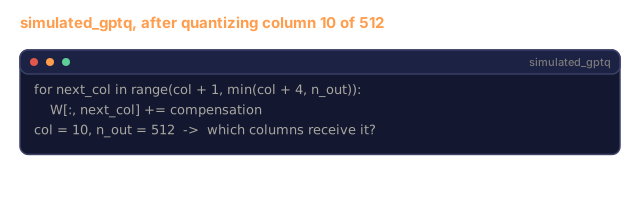
Real GPTQ quantizes one column at a time and uses the Hessian to decide how to spread the rounding error. This is a heavily simplified stand-in. It builds a Hessian-like matrix from the calibration inputs, then pushes a scaled share of each column's rounding error into the next three columns. It does not invert the Hessian.
def simulated_gptq(weight_matrix, calibration_inputs, num_bits=4):
    n_in, n_out = weight_matrix.shape
    qmin = -(2 ** (num_bits - 1))
    qmax = 2 ** (num_bits - 1) - 1

    H = np.zeros((n_in, n_in))
    for x in calibration_inputs:
        x = x.reshape(-1, 1) if x.ndim == 1 else x
        for row in range(x.shape[0]):
            xi = x[row].reshape(-1, 1)
            H += xi @ xi.T
    H /= len(calibration_inputs)
    H += np.eye(n_in) * 1e-4

    weight_importance = np.diag(H)

    quantized = np.zeros_like(weight_matrix, dtype=np.int32)
    scales = np.zeros(n_out)
    errors = np.zeros(n_out)

    W = weight_matrix.copy()

    for col in range(n_out):
        w_col = W[:, col]
        abs_max = np.max(np.abs(w_col))
        if abs_max == 0:
            scales[col] = 1.0
            continue
        scale = abs_max / qmax
        scales[col] = scale

        q_col = np.clip(np.round(w_col / scale), qmin, qmax).astype(np.int32)
        quantized[:, col] = q_col

        quant_error = w_col - q_col * scale
        errors[col] = np.sqrt(np.mean(quant_error ** 2))

        if col < n_out - 1:
            importance_weights = weight_importance / (np.max(weight_importance) + 1e-10)
            for next_col in range(col + 1, min(col + 4, n_out)):
                compensation = quant_error * importance_weights * 0.1
                W[:, next_col] += compensation

    return quantized, scales, {"column_errors": errors,
                               "mean_error": float(np.mean(errors)),
                               "max_error": float(np.max(errors))}


def dequantize_gptq(quantized, scales):
    result = np.zeros_like(quantized, dtype=np.float64)
    for col in range(quantized.shape[1]):
        result[:, col] = quantized[:, col] * scales[col]
    return result
Step 7: AWQ Simulation
AWQ identifies salient weights (those that multiply with large activations) and protects them by scaling before quantization.
def simulated_awq(weight_matrix, calibration_inputs, num_bits=4, salient_fraction=0.01):
    n_in, n_out = weight_matrix.shape
    qmin = -(2 ** (num_bits - 1))
    qmax = 2 ** (num_bits - 1) - 1

    activation_magnitudes = np.zeros(n_in)
    for x in calibration_inputs:
        if x.ndim == 1:
            activation_magnitudes += np.abs(x)
        else:
            activation_magnitudes += np.mean(np.abs(x), axis=0)
    activation_magnitudes /= len(calibration_inputs)

    n_salient = max(1, int(n_in * salient_fraction))
    salient_indices = np.argsort(activation_magnitudes)[-n_salient:]

    scale_factors = np.ones(n_in)
    for idx in salient_indices:
        col_max = np.max(np.abs(weight_matrix[idx, :]))
        if col_max > 0:
            scale_factors[idx] = min(4.0, 1.0 / (col_max + 1e-8) * np.mean(np.abs(weight_matrix)))

    scaled_weights = weight_matrix * scale_factors.reshape(-1, 1)

    quantized, scales = quantize_per_channel(scaled_weights, num_bits, axis=0)
    dequantized = dequantize_per_channel(quantized, scales, axis=0)

    result = dequantized / scale_factors.reshape(-1, 1)

    err = quantization_error(weight_matrix, result)

    return result, {"salient_indices": salient_indices,
                    "scale_factors": scale_factors[salient_indices],
                    "error": err,
                    "n_salient": n_salient}
Step 8: Full Pipeline
Wire everything together. Compare naive quantization, per-channel, GPTQ, and AWQ on the same weight matrix.
def full_quantization_comparison(d_in=256, d_out=512, num_bits=4, n_calibration=32):
    np.random.seed(42)

    weight = np.random.randn(d_in, d_out) * 0.02
    outlier_rows = np.random.choice(d_in, size=5, replace=False)
    weight[outlier_rows] *= 10

    calibration = [np.random.randn(8, d_in) * 0.1 for _ in range(n_calibration)]

    q_naive, s_naive = quantize_symmetric(weight, num_bits)
    recon_naive = dequantize_symmetric(q_naive, s_naive)
    err_naive = quantization_error(weight, recon_naive)

    q_pc, s_pc = quantize_per_channel(weight, num_bits, axis=0)
    recon_pc = dequantize_per_channel(q_pc, s_pc, axis=0)
    err_pc = quantization_error(weight, recon_pc)

    q_gptq, s_gptq, gptq_info = simulated_gptq(weight, calibration, num_bits)
    recon_gptq = dequantize_gptq(q_gptq, s_gptq)
    err_gptq = quantization_error(weight, recon_gptq)

    recon_awq, awq_info = simulated_awq(weight, calibration, num_bits)
    err_awq = awq_info["error"]

    print(f"\n  Full Quantization Comparison ({num_bits}-bit, {d_in}x{d_out} matrix)")
    print(f"  Matrix has {len(outlier_rows)} outlier rows (10x scale)")
    print()
    print(f"  {'Method':<20} {'MSE':>14} {'SNR (dB)':>10} {'Cosine Sim':>12}")
    print(f"  {'-'*58}")
    print(f"  {'Naive per-tensor':<20} {err_naive['mse']:>14.8f} {err_naive['snr_db']:>10.2f} {err_naive['cosine_similarity']:>12.8f}")
    print(f"  {'Per-channel':<20} {err_pc['mse']:>14.8f} {err_pc['snr_db']:>10.2f} {err_pc['cosine_similarity']:>12.8f}")
    print(f"  {'Simulated GPTQ':<20} {err_gptq['mse']:>14.8f} {err_gptq['snr_db']:>10.2f} {err_gptq['cosine_similarity']:>12.8f}")
    print(f"  {'Simulated AWQ':<20} {err_awq['mse']:>14.8f} {err_awq['snr_db']:>10.2f} {err_awq['cosine_similarity']:>12.8f}")

    test_input = np.random.randn(4, d_in) * 0.1
    baseline = test_input @ weight
    output_naive = test_input @ recon_naive
    output_pc = test_input @ recon_pc
    output_gptq = test_input @ recon_gptq
    output_awq = test_input @ recon_awq

    print(f"\n  End-to-End Output Error (matmul with test input):")
    print(f"  {'Method':<20} {'Output MSE':>14} {'Output Cosine':>14}")
    print(f"  {'-'*50}")
    for name, output in [("Naive", output_naive), ("Per-channel", output_pc),
                          ("GPTQ", output_gptq), ("AWQ", output_awq)]:
        out_err = quantization_error(baseline, output)
        print(f"  {name:<20} {out_err['mse']:>14.8f} {out_err['cosine_similarity']:>14.8f}")

    return {"naive": err_naive, "per_channel": err_pc, "gptq": err_gptq, "awq": err_awq}


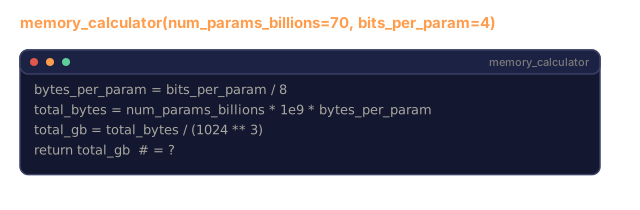
def memory_calculator(num_params_billions, bits_per_param):
    bytes_per_param = bits_per_param / 8
    total_bytes = num_params_billions * 1e9 * bytes_per_param
    total_gb = total_bytes / (1024 ** 3)
    return total_gb


def print_memory_table():
    print("\n  Memory Requirements by Model and Precision:")
    print(f"  {'Model':<15} {'FP32':>8} {'FP16':>8} {'FP8':>8} {'INT8':>8} {'INT4':>8} {'INT2':>8}")
    print(f"  {'-'*64}")
    for name, params in [("7B", 7), ("13B", 13), ("34B", 34), ("70B", 70), ("405B", 405)]:
        fp32 = memory_calculator(params, 32)
        fp16 = memory_calculator(params, 16)
        fp8 = memory_calculator(params, 8)
        int8 = memory_calculator(params, 8)
        int4 = memory_calculator(params, 4)
        int2 = memory_calculator(params, 2)
        print(f"  {name:<15} {fp32:>7.1f}G {fp16:>7.1f}G {fp8:>7.1f}G {int8:>7.1f}G {int4:>7.1f}G {int2:>7.1f}G")


if __name__ == "__main__":
    np.random.seed(42)

    print("=" * 70)
    print("QUANTIZATION: MAKING MODELS FIT")
    print("=" * 70)

    print("\nSTEP 1: Number Format Comparison")
    print("-" * 50)
    for val in [0.1, 3.14159, -0.00073, 42.5, 0.0000012]:
        display_format_comparison(val)

    print("\n\nSTEP 2: Memory Requirements")
    print("-" * 50)
    print_memory_table()

    print("\n\nSTEP 3: Quantization Methods Comparison")
    print("-" * 50)
    weight_matrix = np.random.randn(128, 256) * 0.02
    weight_matrix[0] *= 15
    weight_matrix[42] *= 8
    compare_quantization_methods(weight_matrix, num_bits=8)
    compare_quantization_methods(weight_matrix, num_bits=4)

    print("\n\nSTEP 4: Bit-Width Sweep")
    print("-" * 50)
    sweep_tensor = np.random.randn(64, 128) * 0.05
    bit_width_sweep(sweep_tensor)

    print("\n\nSTEP 5: Sensitivity Experiment")
    print("-" * 50)
    print("\n  INT8:")
    sensitivity_experiment(num_bits=8)
    print("\n  INT4:")
    sensitivity_experiment(num_bits=4)

    print("\n\nSTEP 6: GPTQ vs AWQ vs Naive (INT4)")
    print("-" * 50)
    full_quantization_comparison(d_in=256, d_out=512, num_bits=4)

    print("\n\nSTEP 7: Distribution Analysis")
    print("-" * 50)
    np.random.seed(0)
    simulated_weights = np.random.randn(1000) * 0.02
    abs_vals = np.abs(simulated_weights)
    pct_in_range = np.mean(abs_vals < 0.1) * 100
    print(f"\n  Simulated weight distribution (1000 params, std=0.02):")
    print(f"  Weights in [-0.1, 0.1]: {pct_in_range:.1f}%")
    print(f"  Weights in [-0.05, 0.05]: {np.mean(abs_vals < 0.05) * 100:.1f}%")
    print(f"  Weights in [-0.01, 0.01]: {np.mean(abs_vals < 0.01) * 100:.1f}%")
    print(f"  Max absolute value: {np.max(abs_vals):.6f}")
    print(f"  Mean absolute value: {np.mean(abs_vals):.6f}")

    histogram = np.histogram(simulated_weights, bins=20)
    print(f"\n  Weight histogram:")
    max_count = max(histogram[0])
    for i in range(len(histogram[0])):
        bar_len = int(histogram[0][i] / max_count * 40)
        lo = histogram[1][i]
        hi = histogram[1][i + 1]
        print(f"  [{lo:>7.4f}, {hi:>7.4f}] {'#' * bar_len} ({histogram[0][i]})")

    print("\n\n" + "=" * 70)
    print("DONE")
    print("=" * 70)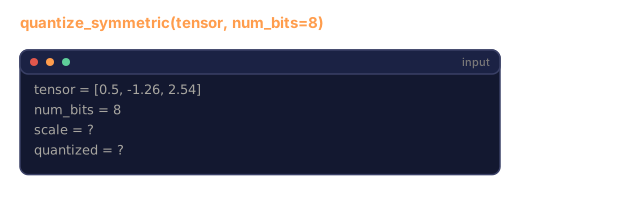
Use It
Quantizing with AutoGPTQ
# pip install auto-gptq transformers
# from auto_gptq import AutoGPTQForCausalLM, BaseQuantizeConfig
# from transformers import AutoTokenizer
#
# model_id = "meta-llama/Llama-3.1-8B"
# quantize_config = BaseQuantizeConfig(
#     bits=4,
#     group_size=128,
#     desc_act=False,
# )
#
# tokenizer = AutoTokenizer.from_pretrained(model_id)
# model = AutoGPTQForCausalLM.from_pretrained(model_id, quantize_config)
#
# calibration = [tokenizer(t, return_tensors="pt") for t in calibration_texts[:128]]
# model.quantize(calibration)
# model.save_quantized("llama-8b-gptq-int4")
Quantizing with AutoAWQ
# pip install autoawq
# from awq import AutoAWQForCausalLM
# from transformers import AutoTokenizer
#
# model_id = "meta-llama/Llama-3.1-8B"
# model = AutoAWQForCausalLM.from_pretrained(model_id)
# tokenizer = AutoTokenizer.from_pretrained(model_id)
#
# model.quantize(tokenizer, quant_config={"zero_point": True, "q_group_size": 128, "w_bit": 4})
# model.save_quantized("llama-8b-awq-int4")
Converting to GGUF
# pip install llama-cpp-python
# python convert_hf_to_gguf.py meta-llama/Llama-3.1-8B --outtype q4_k_m --outfile llama-8b-q4km.gguf
# llama-server -m llama-8b-q4km.gguf -c 4096 -ngl 99
Serving with vLLM
# pip install vllm
# vllm serve model-awq --quantization awq --dtype half --max-model-len 8192
vLLM natively supports AWQ and GPTQ models. It handles the dequantization during matrix multiplication and uses paged attention for the KV cache. For FP8 on H100, add --dtype float8_e4m3fn.
Ship It
This lesson produces outputs/skill-quantization.md, a decision framework for choosing the right quantization strategy. Given your model size, target hardware, and quality requirements, it tells you which format, method, and validation steps to use. It includes memory budget calculations, per-component precision recommendations, and deployment recipes for vLLM, llama.cpp, and TensorRT-LLM.
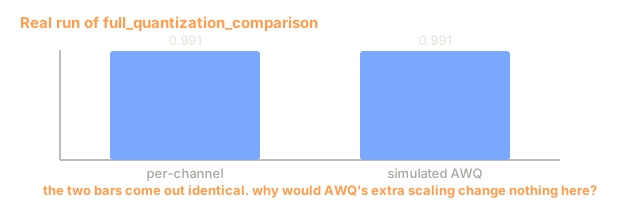
I'd run main.py before rereading the steps. The block worth staring at is the INT4 comparison in Step 8 (printed as STEP 6 in the output), where naive per-tensor quantization lands at about 0.82 cosine similarity on the weight matrix and per-channel gets to about 0.99. Five outlier rows at 10x scale stretch the single shared scale, and that gap is the case for per-channel scales.
Two results surprised me, and I left them in. The simulated GPTQ does worse than plain per-channel (about 0.93 cosine against 0.99), and the simulated AWQ matches per-channel exactly. The GPTQ stand-in only moves a fraction of each column's error into its neighbors, so read it as a sketch and not as evidence about the real method. In the AWQ stand-in, the scale applied to the salient rows is divided back out after quantization. The quantizer already keeps one scale per row, so the extra scaling has nothing to change. Group quantization (exercise 1) is where I'd try it next.
The Step 5 ordering also runs against the hierarchy in the Concept section. At INT4, quantizing weights alone adds the most error (cosine about 0.988), ahead of the KV cache and activations (both about 0.993). The attention row is injected noise rather than quantization, so it is not comparable to the others. I put this down to the toy: a random 64-dim layer over 16 tokens has no activation outliers and no long context for KV error to compound over, which are the two things the hierarchy argument leans on.
The memory table divides by 1024^3, so it prints GiB. The 70B row comes out below the 140GB headline for that reason.
Exercises
-
Implement group quantization. Instead of one scale per channel, use one scale per group of 128 weights within a channel. This is what GPTQ and AWQ actually use. Compare group sizes of 32, 64, 128, and 256 on the same weight matrix. Smaller groups give better quality but more storage overhead for scale factors.
-
Build a mixed-precision quantizer. Quantize the first and last layers of a multi-layer network at INT8 while quantizing middle layers at INT4. Compare end-to-end output quality against uniform INT4 and uniform INT8. Measure the memory savings compared to all-INT8.
-
Implement the straight-through estimator (STE) for quantization-aware training. Insert fake quantize/dequantize operations in the forward pass of a simple two-layer network trained on a regression task. Compare final loss between a model trained normally (then PTQ to INT4) versus a model trained with QAT from the start.
-
Build an outlier-aware quantizer inspired by LLM.int8(). Detect channels where the activation magnitude exceeds 6x the mean. Keep those channels in FP16 and quantize everything else to INT8. Measure end-to-end quality on the transformer layer from Step 5 with varying outlier thresholds (3x, 6x, 10x).
-
Implement a quantization quality dashboard. Given a weight matrix, compute and display: the weight distribution histogram, the quantization error distribution, per-channel scale factors, the worst-quantized channels (highest reconstruction error), and the cosine similarity between original and quantized outputs across 100 random inputs. Identify which channels should be kept at higher precision.
Key Terms
| Term | What people say | What it actually means |
|---|---|---|
| FP16 | "Half precision" | 16-bit float with 5 exponent bits and 10 mantissa bits, max value 65,504, standard inference format |
| BF16 | "Brain float" | 16-bit float with 8 exponent bits (same range as FP32) and 7 mantissa bits, designed by Google for training |
| FP8 | "Eight-bit float" | Two variants: E4M3 (inference, more precision) and E5M2 (training, more range), native on H100 |
| INT8 | "Eight-bit integer" | 256 uniformly spaced values from -128 to 127, needs a scale factor to map from floats |
| INT4 | "Four-bit integer" | 16 levels total, requires sophisticated methods (GPTQ, AWQ) to maintain quality |
| Per-channel quantization | "One scale per row" | Uses a separate scale factor for each output channel instead of one for the whole tensor, dramatically reduces error |
| GPTQ | "The Hessian method" | Post-training quantization using second-order information to minimize output error, one layer at a time |
| AWQ | "Activation-aware" | Scales salient weights (those multiplied by large activations) before quantization to protect them |
| GGUF | "The llama.cpp format" | Self-contained model file with mixed-precision layers, optimized for CPU and Apple Silicon inference |
| PTQ | "Quantize after training" | Convert a trained model's weights to lower precision without retraining, fast but limited at extreme compression |
| QAT | "Quantize during training" | Insert fake quantization into the forward pass so the model learns to tolerate rounding, better at INT4/INT2 |
| Calibration data | "The 128 examples" | A small dataset run through the model to compute activation statistics for setting scale factors |
| Scale factor | "The multiplier" | Converts between floating-point range and integer range: float_val = int_val * scale |
| Perplexity delta | "How much worse" | Difference in perplexity between original and quantized model, < 0.5 is excellent, > 2.0 is a problem |
Further Reading
- Frantar et al., 2022 -- "GPTQ: Accurate Post-Training Quantization for Generative Pre-trained Transformers" -- the paper that made INT4 quantization practical for LLMs using Hessian-guided weight rounding
- Lin et al., 2023 -- "AWQ: Activation-aware Weight Quantization for LLM Compression and Acceleration" -- protecting salient weights by scaling before quantization, matching or beating GPTQ
- Dettmers et al., 2022 -- "LLM.int8(): 8-bit Matrix Multiplication for Transformers at Scale" -- mixed-precision INT8 that keeps outlier features in FP16, enabling INT8 inference without quality loss
- Xiao et al., 2023 -- "SmoothQuant: Accurate and Efficient Post-Training Quantization for Large Language Models" -- migrating quantization difficulty from activations to weights for W8A8 deployment
- Micikevicius et al., 2022 -- "FP8 Formats for Deep Learning" -- the NVIDIA/ARM/Intel paper defining E4M3 and E5M2 formats now native on H100