Introduction to PyTorch
You built the engine from pistons and crankshafts. Now learn the one everyone actually drives.
Learning Objectives
- Build and train neural networks using PyTorch's nn.Module, nn.Sequential, and autograd
- Use PyTorch tensors, GPU acceleration, and the standard training loop (zero_grad, forward, loss, backward, step)
- Convert your from-scratch mini framework components to their PyTorch equivalents
- Profile and compare training speed between your pure-Python framework and PyTorch on the same task
The Problem
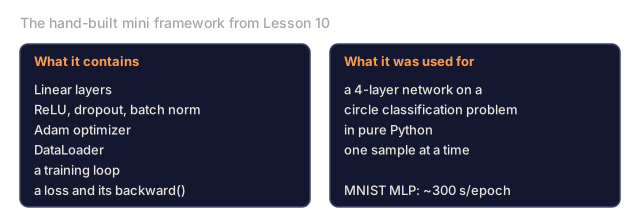
You've got a working mini framework: linear layers, ReLU, dropout, batch norm, Adam, a DataLoader, a training loop. It trains a 4-layer network on a circle classification problem in pure Python.
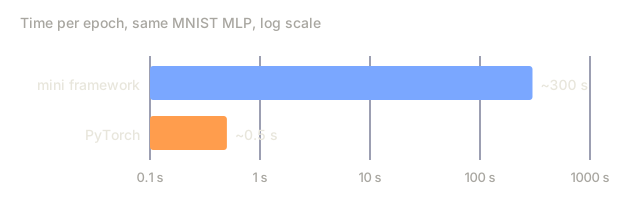
It's also 500x slower than PyTorch on the same problem.
Your mini framework processes one sample at a time with nested Python loops. PyTorch dispatches the same operations to optimized C++/CUDA kernels that run on GPU. On a single NVIDIA A100, PyTorch trains a ResNet-50 (25.6M parameters) on ImageNet (1.28M images) in about 6 hours. Your framework would take roughly 3,000 hours on the same task, assuming it didn't run out of memory first.
Speed isn't the only gap. Your framework has no GPU support. No automatic differentiation: you hand-wrote backward() for every module. No serialization. No distributed training. No mixed precision. No way to debug gradient flow without print statements.
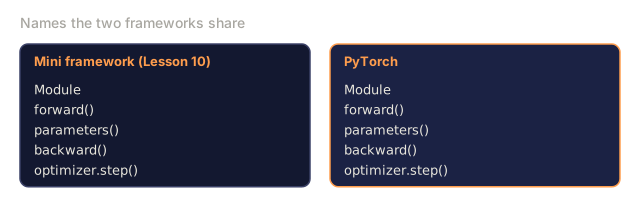
PyTorch fills nearly every one of these gaps as a framework (distributed training is its own topic later in the curriculum), and it does so while keeping the exact same mental model you already built: Module, forward(), parameters(), backward(), optimizer.step(). The concepts transfer one-to-one. The syntax is nearly identical. What's different is that PyTorch wraps a decade of systems engineering behind the same interface you designed from scratch.
The Concept
Why PyTorch Won
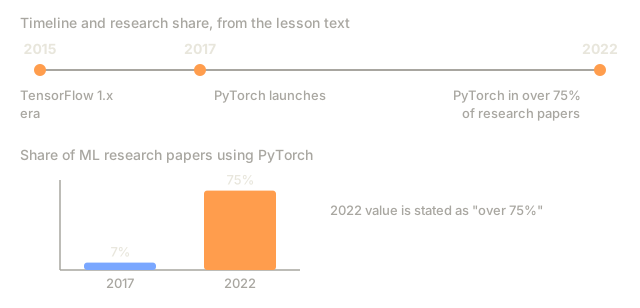
In 2015, TensorFlow required you to define a static computation graph before running anything. You built the graph, compiled it, then fed data through it. Debugging meant staring at graph visualizations. Changing the architecture meant rebuilding the graph from scratch.
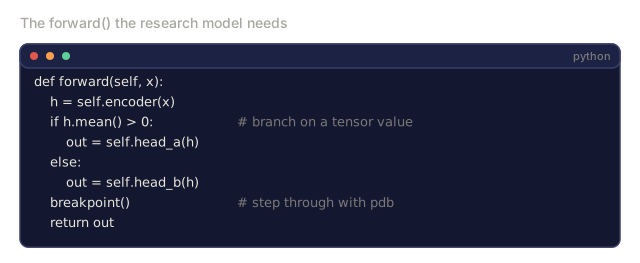
PyTorch launched in 2017 with a different philosophy: eager execution. You write Python. It runs immediately. y = model(x) actually computes y right now, not "add a node to a graph that will compute y later." This meant standard Python debugging tools worked. print() worked. pdb worked. if/else in your forward pass worked.
By 2020, the market had spoken. PyTorch's share in ML research papers went from 7% (2017) to over 75% (2022). Meta, Google DeepMind, OpenAI, Anthropic, and Hugging Face all use PyTorch as their primary framework. TensorFlow 2.x adopted eager execution in response: a tacit admission that PyTorch's design was correct.
The lesson: developer experience compounds. A framework that's 10% slower but 50% faster to debug wins every time.
Tensors
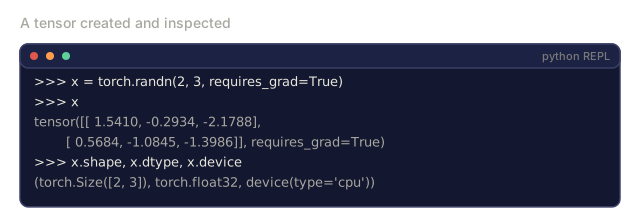
A tensor is a multi-dimensional array with three critical properties: shape, dtype, and device.
import torch

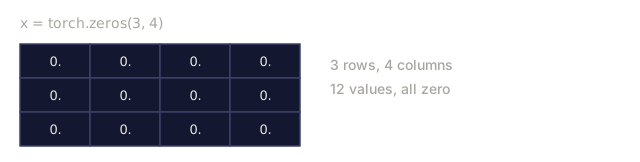
x = torch.zeros(3, 4)           # shape: (3, 4), dtype: float32, device: cpu
x = torch.randn(2, 3, 224, 224) # batch of 2 RGB images, 224x224
x = torch.tensor([1, 2, 3])     # from a Python list
Shape is the dimensionality. A scalar is shape (), a vector is (n,), a matrix is (m, n), a batch of images is (batch, channels, height, width).
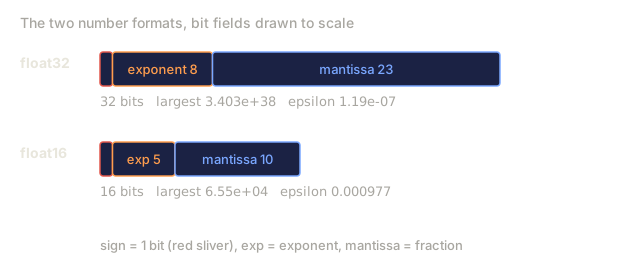
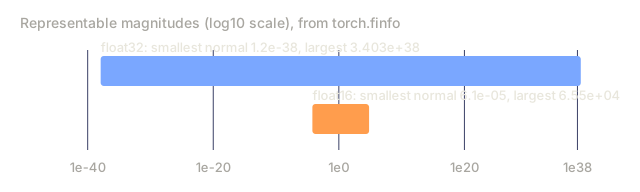
Dtype controls precision and memory.
| dtype | Bits | Range | Use case |
|---|---|---|---|
| float32 | 32 | ~7 decimal digits | Default training |
| float16 | 16 | ~3.3 decimal digits | Mixed precision |
| bfloat16 | 16 | Same range as float32, less precision | LLM training |
| int8 | 8 | -128 to 127 | Quantized inference |
Device determines where computation happens: cpu runs on the processor, cuda targets an NVIDIA GPU (AMD's ROCm and Apple's MPS cover the same job on their own hardware).
device = torch.device("cuda" if torch.cuda.is_available() else "cpu")
x = torch.randn(3, 4, device=device)
x = x.to("cuda")
x = x.cpu()
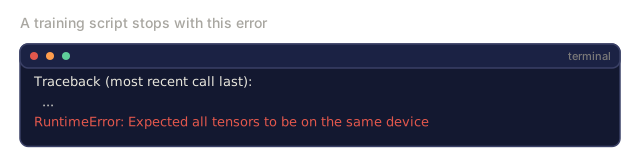
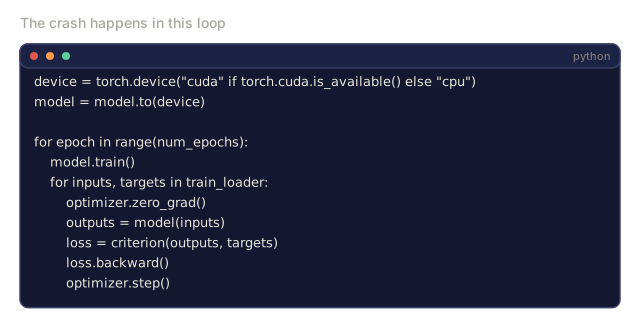
Every operation requires all tensors on the same device. This is the #1 PyTorch error beginners hit: RuntimeError: Expected all tensors to be on the same device. Fix it by moving everything to the same device before computation.
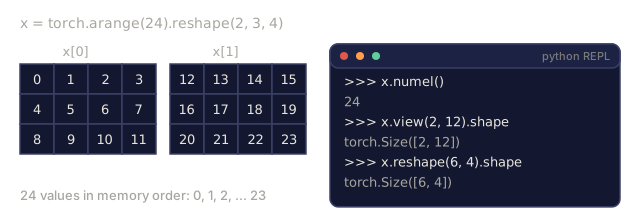
Reshaping is constant-time: it changes the metadata, not the data.
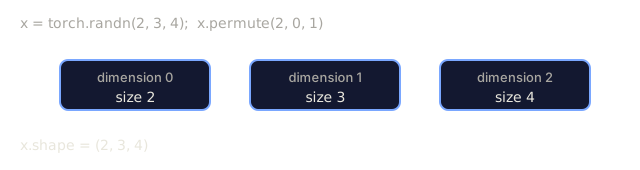
x = torch.randn(2, 3, 4)
x.view(2, 12)      # reshape to (2, 12) -- must be contiguous
x.reshape(6, 4)    # reshape to (6, 4) -- works always
x.permute(2, 0, 1) # reorder dimensions
x.unsqueeze(0)     # add dimension: (1, 2, 3, 4)
x.squeeze()        # remove size-1 dimensions
Autograd
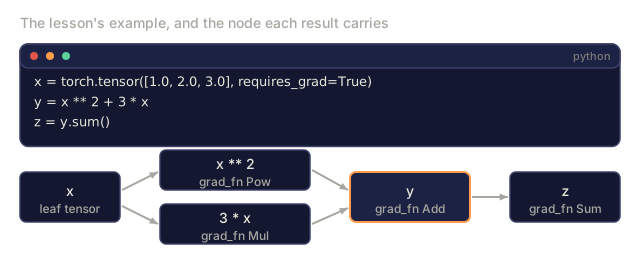
PyTorch's autograd records every operation on tensors into a directed acyclic graph (the computational graph), then traverses that graph in reverse to compute gradients automatically. Your mini framework never gave you this: you hand-wrote backward() for every module.

Mechanically, this runs on tape-based autodiff: every operation appends to a "tape" during the forward pass, and calling .backward() replays the tape in reverse.
x = torch.randn(3, requires_grad=True)
y = x ** 2 + 3 * x
z = y.sum()
z.backward()
print(x.grad)  # dz/dx = 2x + 3
Three rules of autograd:
- Only leaf tensors with
requires_grad=Trueaccumulate gradients - Gradients accumulate by default: call
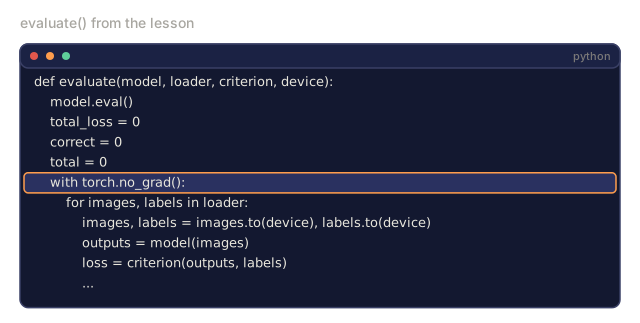
optimizer.zero_grad()before each backward pass torch.no_grad()disables gradient tracking (use during evaluation)
nn.Module
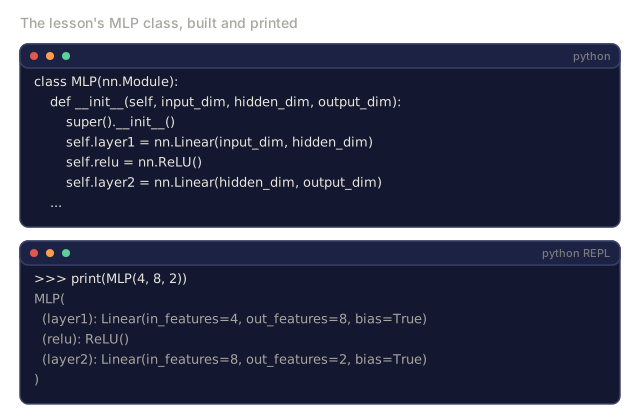
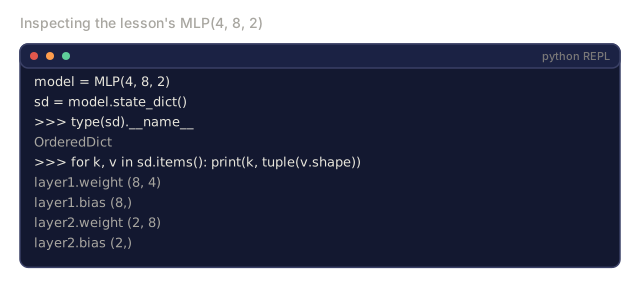
nn.Module is the base class for every neural network component in PyTorch. You already built this abstraction in Lesson 10. PyTorch's version adds automatic parameter registration, recursive module discovery, device management, and state dict serialization.
import torch.nn as nn

class MLP(nn.Module):
    def __init__(self, input_dim, hidden_dim, output_dim):
        super().__init__()
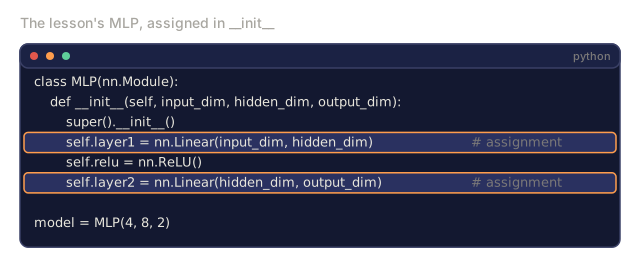
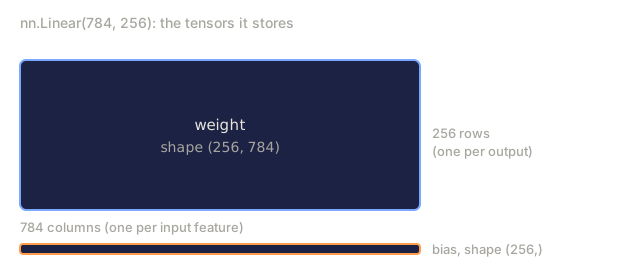
        self.layer1 = nn.Linear(input_dim, hidden_dim)
        self.relu = nn.ReLU()
        self.layer2 = nn.Linear(hidden_dim, output_dim)

    def forward(self, x):
        x = self.layer1(x)
        x = self.relu(x)
        x = self.layer2(x)
        return x
When you assign an nn.Module or nn.Parameter as an attribute in __init__, PyTorch automatically registers it. model.parameters() recursively collects every registered parameter. This is why you never have to manually gather weights like you did in the mini framework.
Key building blocks:
| Module | What it does | Parameters |
|---|---|---|
| nn.Linear(in, out) | Wx + b | in*out + out |
| nn.Conv2d(in_ch, out_ch, k) | 2D convolution | in_chout_chk*k + out_ch |
| nn.BatchNorm1d(features) | Normalize activations | 2 * features |
| nn.Dropout(p) | Random zeroing | 0 |
| nn.ReLU() | max(0, x) | 0 |
| nn.GELU() | Gaussian error linear | 0 |
| nn.Embedding(vocab, dim) | Lookup table | vocab * dim |
| nn.LayerNorm(dim) | Per-sample normalization | 2 * dim |
Loss Functions and Optimizers
PyTorch ships production-ready versions of everything you built.
Loss functions (from torch.nn):
| Loss | Task | Input |
|---|---|---|
| nn.MSELoss() | Regression | Any shape |
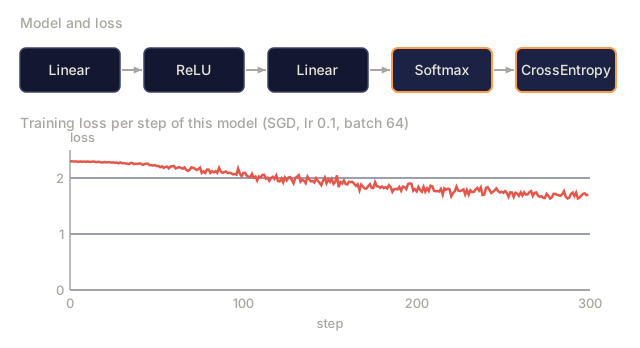
| nn.CrossEntropyLoss() | Multi-class classification | Logits (not softmax) |
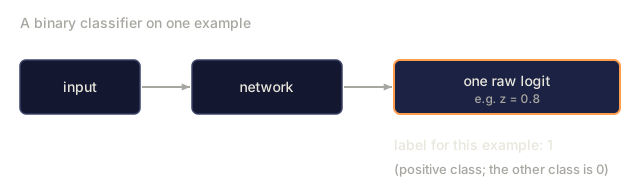
| nn.BCEWithLogitsLoss() | Binary classification | Logits (not sigmoid) |
| nn.L1Loss() | Regression (robust) | Any shape |
| nn.CTCLoss() | Sequence alignment | Log probabilities |
Note: CrossEntropyLoss combines LogSoftmax + NLLLoss internally. Pass raw logits, not softmax outputs. This is a common mistake that produces wrong gradients silently.
Optimizers (from torch.optim):
| Optimizer | When to use | Typical LR |
|---|---|---|
| SGD(params, lr, momentum) | CNNs, well-tuned pipelines | 0.01--0.1 |
| Adam(params, lr) | Default starting point | 1e-3 |
| AdamW(params, lr, weight_decay) | Transformers, fine-tuning | 1e-4--1e-3 |
| LBFGS(params) | Small-scale, second-order | 1.0 |
The Training Loop
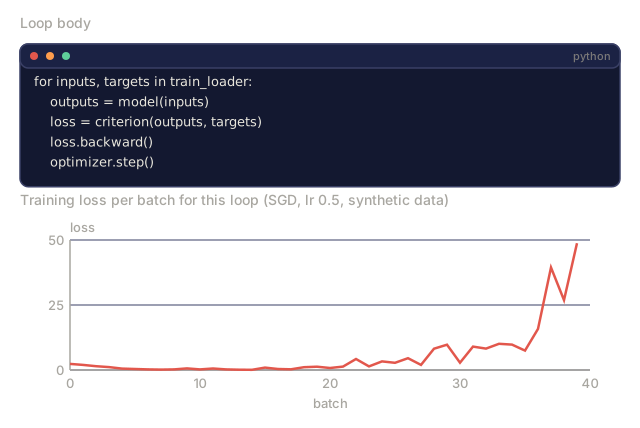
Every PyTorch training loop follows the same 5-step pattern. You already know this from Lesson 10.

The canonical pattern:
for epoch in range(num_epochs):
    model.train()
    for inputs, targets in train_loader:
        inputs, targets = inputs.to(device), targets.to(device)
        optimizer.zero_grad()
        outputs = model(inputs)
        loss = criterion(outputs, targets)
        loss.backward()
        optimizer.step()
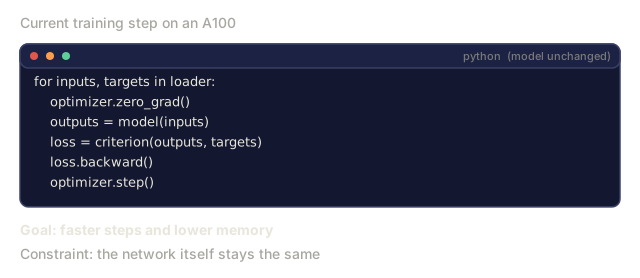
Five lines inside the batch loop. Five lines that trained GPT-4, Stable Diffusion, and LLaMA. The architecture changes. The data changes. These five lines do not.
Dataset and DataLoader
PyTorch's Dataset is an abstract class with two methods: __len__ and __getitem__. DataLoader wraps it with batching, shuffling, and multi-process data loading.
from torch.utils.data import Dataset, DataLoader

class MNISTDataset(Dataset):
    def __init__(self, images, labels):
        self.images = images
        self.labels = labels

    def __len__(self):
        return len(self.labels)

    def __getitem__(self, idx):
        return self.images[idx], self.labels[idx]

loader = DataLoader(dataset, batch_size=64, shuffle=True, num_workers=4)
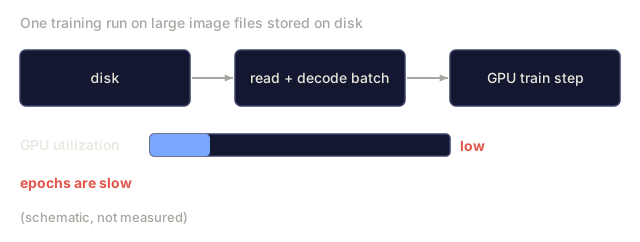
num_workers=4 spawns 4 processes to load data in parallel while the GPU trains on the current batch. On disk-bound workloads (large images, audio), this alone can double training speed.
GPU Training
Moving a model to GPU:
device = torch.device("cuda" if torch.cuda.is_available() else "cpu")
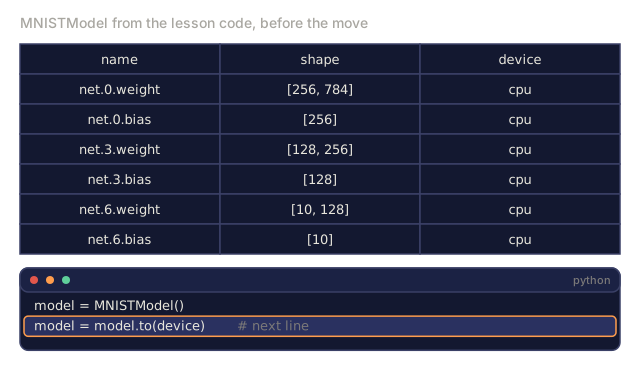
model = model.to(device)
This recursively moves every parameter and buffer to the GPU. Then move each batch during training:
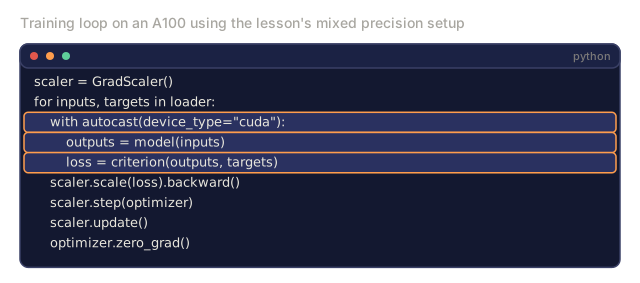
inputs, targets = inputs.to(device), targets.to(device)Mixed precision halves memory usage and doubles throughput on modern GPUs (A100, H100, RTX 4090) by running forward/backward in float16 while keeping the master weights in float32:
from torch.amp import autocast, GradScaler

scaler = GradScaler()
for inputs, targets in loader:
    with autocast(device_type="cuda"):
        outputs = model(inputs)
        loss = criterion(outputs, targets)
    scaler.scale(loss).backward()
    scaler.step(optimizer)
    scaler.update()
    optimizer.zero_grad()
Comparison: Mini Framework vs PyTorch vs JAX
JAX is Google's array library: the same NumPy-style operations as PyTorch, but built around composable function transforms (grad, jit, vmap) instead of an object-oriented Module system. You'll build with it directly in the next lesson; for now, here's how the three stack up.
| Feature | Mini Framework (L10) | PyTorch | JAX |
|---|---|---|---|
| Autodiff | Manual backward() | Tape-based autograd | Functional transforms |
| Execution | Eager (Python loops) | Eager (C++ kernels) | Traced + JIT compiled |
| GPU support | No | Yes (CUDA, ROCm, MPS) | Yes (CUDA, TPU) |
| Speed (MNIST MLP) | ~300s/epoch | ~0.5s/epoch | ~0.3s/epoch |
| Module system | Custom Module class | nn.Module | Stateless functions (Flax/Equinox) |
| Debugging | print() | print(), pdb, breakpoint() | Harder (JIT tracing breaks print) |
| Ecosystem | None | Hugging Face, Lightning, timm | Flax, Optax, Orbax |
| Learning curve | You built it | Moderate | Steep (functional paradigm) |
| Production use | Toy problems | Meta, OpenAI, Anthropic, HF | Google DeepMind, Midjourney |
![A Python session: import torch, x = torch.tensor([1.0, 2.0, 3.0]), y = x * 2, print(y), and its printed output tensor([2., 4., 6.]).](/quiz-visuals/03-deep-learning-core/11-intro-to-pytorch/n4.svg)
![A tiny SGD example: w = [1.0, 2.0] with requires_grad, loss = (w ** 2).sum(), loss.backward(), then w.grad printed as tensor([2., 4.]); the next line, optimizer.zero_grad(), is highlighted as about to run.](/quiz-visuals/03-deep-learning-core/11-intro-to-pytorch/n7.svg)
![The lesson's example with x = [1.0, 2.0, 3.0] requiring grad and z = (x ** 2 + 3 * x).sum() printing tensor(32., grad_fn=SumBackward0); x.grad is None, and z.backward() is highlighted as the next call.](/quiz-visuals/03-deep-learning-core/11-intro-to-pytorch/n8.svg)
![A TensorDataset of ten samples with len 10 and ds[0] printed, then a DataLoader with batch_size=4 and shuffle=True; looping over it prints the label lists of three batches of sizes 4, 4 and 2.](/quiz-visuals/03-deep-learning-core/11-intro-to-pytorch/n9.svg)
![Code: x = [1.0, 2.0, -1.0] with requires_grad, y = x ** 2 + 3 * x, z = y.sum(), z.backward(), then print(x.grad) is highlighted with a question mark.](/quiz-visuals/03-deep-learning-core/11-intro-to-pytorch/n16.svg)
![Two panels run the same function (y = x * 2, print y, return y.sum()): in PyTorch it prints y = tensor([2., 4., 6.]) and returns 12.; in JAX under @jax.jit it prints y = JitTracer(float32[3]) and then 12.0.](/quiz-visuals/03-deep-learning-core/11-intro-to-pytorch/n24.svg)
Build It
A 3-layer MLP trained on MNIST using only PyTorch primitives. No high-level wrappers. No torchvision.datasets. We download and parse the raw data ourselves.
Step 1: Load MNIST From Raw Files
MNIST ships as 4 gzipped files: training images (60,000 x 28 x 28), training labels, test images (10,000 x 28 x 28), test labels. We download them and parse the binary format.
import torch
import torch.nn as nn
import struct
import gzip
import urllib.request
import os

def download_mnist(path="./mnist_data"):
    base_url = "https://storage.googleapis.com/cvdf-datasets/mnist/"
    files = [
        "train-images-idx3-ubyte.gz",
        "train-labels-idx1-ubyte.gz",
        "t10k-images-idx3-ubyte.gz",
        "t10k-labels-idx1-ubyte.gz",
    ]
    os.makedirs(path, exist_ok=True)
    for f in files:
        filepath = os.path.join(path, f)
        if not os.path.exists(filepath):
            urllib.request.urlretrieve(base_url + f, filepath)

def load_images(filepath):
    with gzip.open(filepath, "rb") as f:
        magic, num, rows, cols = struct.unpack(">IIII", f.read(16))
        data = f.read()
        images = torch.frombuffer(bytearray(data), dtype=torch.uint8)
        images = images.reshape(num, rows * cols).float() / 255.0
    return images

def load_labels(filepath):
    with gzip.open(filepath, "rb") as f:
        magic, num = struct.unpack(">II", f.read(8))
        data = f.read()
        labels = torch.frombuffer(bytearray(data), dtype=torch.uint8).long()
    return labels
Step 2: Define the Model
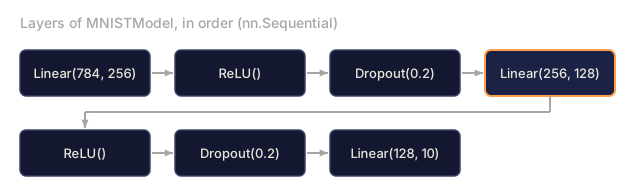
A 3-layer MLP: 784 -> 256 -> 128 -> 10. ReLU activations. Dropout for regularization. No batch norm to keep it simple.
class MNISTModel(nn.Module):
    def __init__(self):
        super().__init__()
        self.net = nn.Sequential(
            nn.Linear(784, 256),
            nn.ReLU(),
            nn.Dropout(0.2),
            nn.Linear(256, 128),
            nn.ReLU(),
            nn.Dropout(0.2),
            nn.Linear(128, 10),
        )

    def forward(self, x):
        return self.net(x)
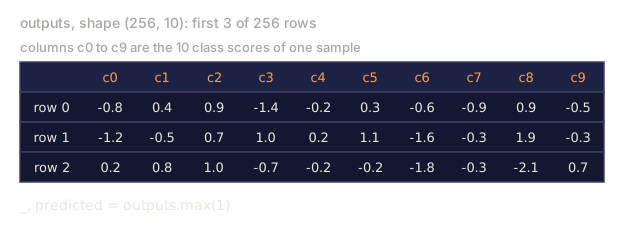
The output layer produces 10 raw logits (one per digit). No softmax: CrossEntropyLoss handles that internally.
Parameter count: 784256 + 256 + 256128 + 128 + 128*10 + 10 = 235,146. Tiny by modern standards. GPT-2 small has 124M. This trains in seconds.
Step 3: Training Loop
The canonical forward-loss-backward-step pattern.
def train_one_epoch(model, loader, criterion, optimizer, device):
    model.train()
    total_loss = 0
    correct = 0
    total = 0
    for images, labels in loader:
        images, labels = images.to(device), labels.to(device)
        optimizer.zero_grad()
        outputs = model(images)
        loss = criterion(outputs, labels)
        loss.backward()
        optimizer.step()
        total_loss += loss.item() * images.size(0)
        _, predicted = outputs.max(1)
        correct += predicted.eq(labels).sum().item()
        total += labels.size(0)
    return total_loss / total, correct / total


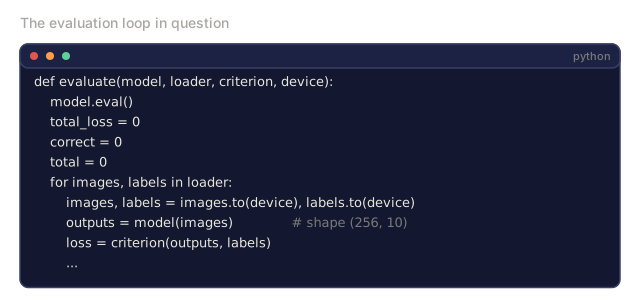
def evaluate(model, loader, criterion, device):
    model.eval()
    total_loss = 0
    correct = 0
    total = 0
    with torch.no_grad():
        for images, labels in loader:
            images, labels = images.to(device), labels.to(device)
            outputs = model(images)
            loss = criterion(outputs, labels)
            total_loss += loss.item() * images.size(0)
            _, predicted = outputs.max(1)
            correct += predicted.eq(labels).sum().item()
            total += labels.size(0)
    return total_loss / total, correct / total
Note torch.no_grad() during evaluation. This disables autograd, reducing memory usage and speeding up inference. Without it, PyTorch builds a computational graph you never use.
Step 4: Wire Everything Together
def main():
    device = torch.device("cuda" if torch.cuda.is_available() else "cpu")

    download_mnist()
    train_images = load_images("./mnist_data/train-images-idx3-ubyte.gz")
    train_labels = load_labels("./mnist_data/train-labels-idx1-ubyte.gz")
    test_images = load_images("./mnist_data/t10k-images-idx3-ubyte.gz")
    test_labels = load_labels("./mnist_data/t10k-labels-idx1-ubyte.gz")

    train_dataset = torch.utils.data.TensorDataset(train_images, train_labels)
    test_dataset = torch.utils.data.TensorDataset(test_images, test_labels)
    train_loader = torch.utils.data.DataLoader(
        train_dataset, batch_size=64, shuffle=True
    )
    test_loader = torch.utils.data.DataLoader(
        test_dataset, batch_size=256, shuffle=False
    )

    model = MNISTModel().to(device)
    criterion = nn.CrossEntropyLoss()
    optimizer = torch.optim.Adam(model.parameters(), lr=1e-3)

    num_params = sum(p.numel() for p in model.parameters())
    print(f"Device: {device}")
    print(f"Parameters: {num_params:,}")
    print(f"Train samples: {len(train_dataset):,}")
    print(f"Test samples: {len(test_dataset):,}")
    print()

    for epoch in range(10):
        train_loss, train_acc = train_one_epoch(
            model, train_loader, criterion, optimizer, device
        )
        test_loss, test_acc = evaluate(
            model, test_loader, criterion, device
        )
        print(
            f"Epoch {epoch+1:2d} | "
            f"Train Loss: {train_loss:.4f} | Train Acc: {train_acc:.4f} | "
            f"Test Loss: {test_loss:.4f} | Test Acc: {test_acc:.4f}"
        )

    torch.save(model.state_dict(), "mnist_mlp.pt")
    print(f"\nModel saved to mnist_mlp.pt")
    print(f"Final test accuracy: {test_acc:.4f}")
Expected output after 10 epochs: ~97.8% test accuracy. Training time on CPU: ~30 seconds. On GPU: ~5 seconds. On your mini framework with the same architecture: ~45 minutes.
Use It
Quick Comparison: Mini Framework vs PyTorch
| Mini Framework (Lesson 10) | PyTorch |
|---|---|
model = Sequential(Linear(784, 256), ReLU(), ...) | model = nn.Sequential(nn.Linear(784, 256), nn.ReLU(), ...) |
pred = model.forward(x) | pred = model(x) |
optimizer.zero_grad() | optimizer.zero_grad() |
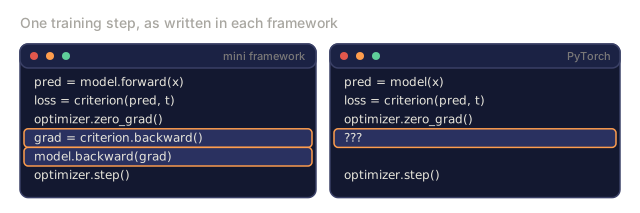
grad = criterion.backward() then model.backward(grad) | loss.backward() |
optimizer.step() | optimizer.step() |
| No GPU | model.to("cuda") |
| Manual backward for every module | Autograd handles everything |
The interface is nearly identical. The difference is everything under the hood.
Saving and Loading Models
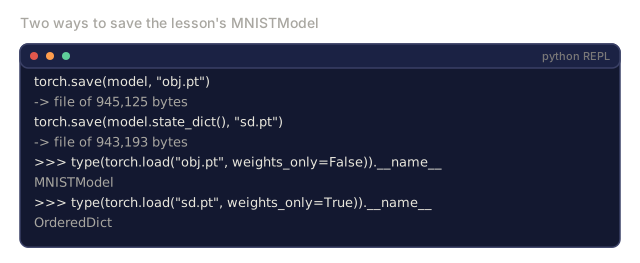
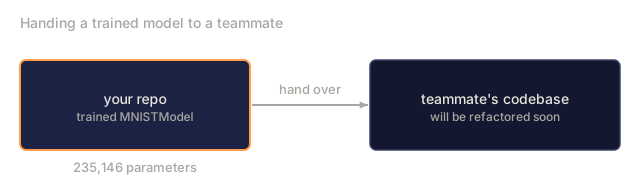
Always save state_dict() (the parameter dictionary), not the model object: saving the object itself relies on pickle, which breaks the moment you refactor your code, while a state dict stays portable.
torch.save(model.state_dict(), "model.pt")

model = MNISTModel()
model.load_state_dict(torch.load("model.pt", weights_only=True))
model.eval()
Learning Rate Scheduling
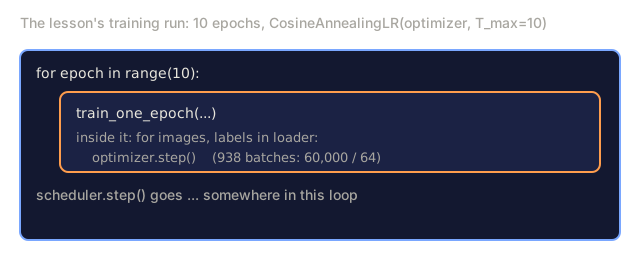
A constant learning rate rarely stays optimal for an entire run, which is why Lesson 09 built one from scratch. PyTorch wires the same idea into the optimizer interface through a scheduler.
scheduler = torch.optim.lr_scheduler.CosineAnnealingLR(
    optimizer, T_max=10
)
for epoch in range(10):
    train_one_epoch(model, train_loader, criterion, optimizer, device)
    scheduler.step()
PyTorch ships 15+ schedulers: StepLR, ExponentialLR, CosineAnnealingLR, OneCycleLR, ReduceLROnPlateau. All plug into the same optimizer interface.
Ship It
This lesson produces two artifacts:
outputs/prompt-pytorch-debugger.md, a prompt for diagnosing common PyTorch training failuresoutputs/skill-pytorch-patterns.md, a skill reference for PyTorch training patterns
The first time you swap your hand-written backward() for a single loss.backward() call, it feels like cheating. You spent ten lessons earning that mental model, and PyTorch collapses it into one line. Good. The model still transfers completely: forward, loss, backward, step. What the hand-rolled version bought you wasn't speed, it was the ability to read a bad gradient's stack trace and know exactly which layer produced it.
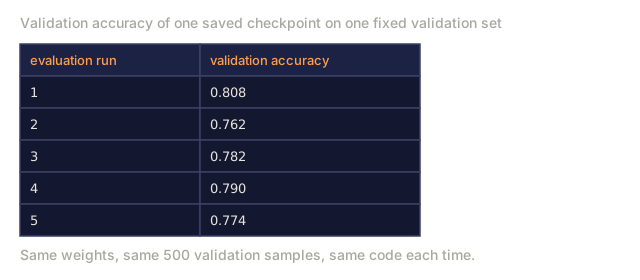
Two bugs will eat your first week with PyTorch, and neither one is really a bug. The device-mismatch RuntimeError, because one tensor slipped past a .to(device) call. And silently wrong validation accuracy from forgetting model.eval(), so dropout keeps randomly zeroing activations at test time. Both are one-line fixes once you know to look for them. Now you do.
Exercises
-
Add batch normalization. Insert
nn.BatchNorm1dafter each linear layer (before the activation). Compare test accuracy and training speed vs the dropout-only version. Batch norm should reach 98%+ in fewer epochs. -
Implement a learning rate finder. Train for one epoch with exponentially increasing learning rate (from 1e-7 to 1.0). Plot loss vs LR. The optimal LR is just before the loss starts climbing. Use this to pick a better LR for the MNIST model.
-
Port to GPU with mixed precision. Add
torch.amp.autocastandGradScalerto the training loop. Measure throughput (samples/second) with and without mixed precision on GPU. On an A100, expect ~2x speedup. -
Build a custom Dataset. Download Fashion-MNIST (same format as MNIST but with clothing items). Implement a
FashionMNISTDataset(Dataset)class with__getitem__and__len__. Train the same MLP and compare accuracy. Fashion-MNIST is harder: expect ~88% vs ~98%. -
Replace Adam with SGD + momentum. Train with
SGD(params, lr=0.01, momentum=0.9). Compare convergence curves. Then add aCosineAnnealingLRscheduler and see if SGD catches up to Adam by epoch 10.
Key Terms
| Term | What people say | What it actually means |
|---|---|---|
| Tensor | "A multi-dimensional array" | A typed, device-aware array with automatic differentiation support baked into every operation |
| Autograd | "Automatic backprop" | A tape-based system that records operations during forward pass, then replays them in reverse to compute exact gradients |
| nn.Module | "A layer" | The base class for any differentiable computation block: registers parameters, supports nesting, handles train/eval modes |
| state_dict | "The model weights" | An OrderedDict mapping parameter names to tensors, the portable, serializable representation of a trained model |
| .backward() | "Compute gradients" | Traverse the computational graph in reverse, computing and accumulating gradients for every leaf tensor with requires_grad=True |
| .to(device) | "Move to GPU" | Recursively transfer all parameters and buffers to the specified device (CPU, CUDA, MPS) |
| DataLoader | "The data pipeline" | An iterator that batches, shuffles, and optionally parallelizes data loading from a Dataset |
| Mixed precision | "Use float16" | Train with float16 forward/backward for speed while keeping float32 master weights for numerical stability |
| Eager execution | "Run it now" | Operations execute immediately when called, not deferred to a later compilation step, the core design choice that differentiates PyTorch from TF 1.x |
| zero_grad | "Reset gradients" | Set all parameter gradients to zero before the next backward pass, since PyTorch accumulates gradients by default |
Further Reading
- Paszke et al., "PyTorch: An Imperative Style, High-Performance Deep Learning Library" (2019) — the original paper explaining PyTorch's design tradeoffs
- PyTorch Tutorials: "Learning PyTorch with Examples" (https://pytorch.org/tutorials/beginner/pytorch_with_examples.html) — the official path from tensors to nn.Module
- PyTorch Performance Tuning Guide (https://pytorch.org/tutorials/recipes/recipes/tuning_guide.html) — mixed precision, DataLoader workers, pinned memory, and other production optimizations
- Horace He, "Making Deep Learning Go Brrrr" (https://horace.io/brrr_intro.html) — why GPU training is fast, with PyTorch-specific optimization strategies
Code
- pytorch_intro.py (python, 359 lines)